VOR / OBS
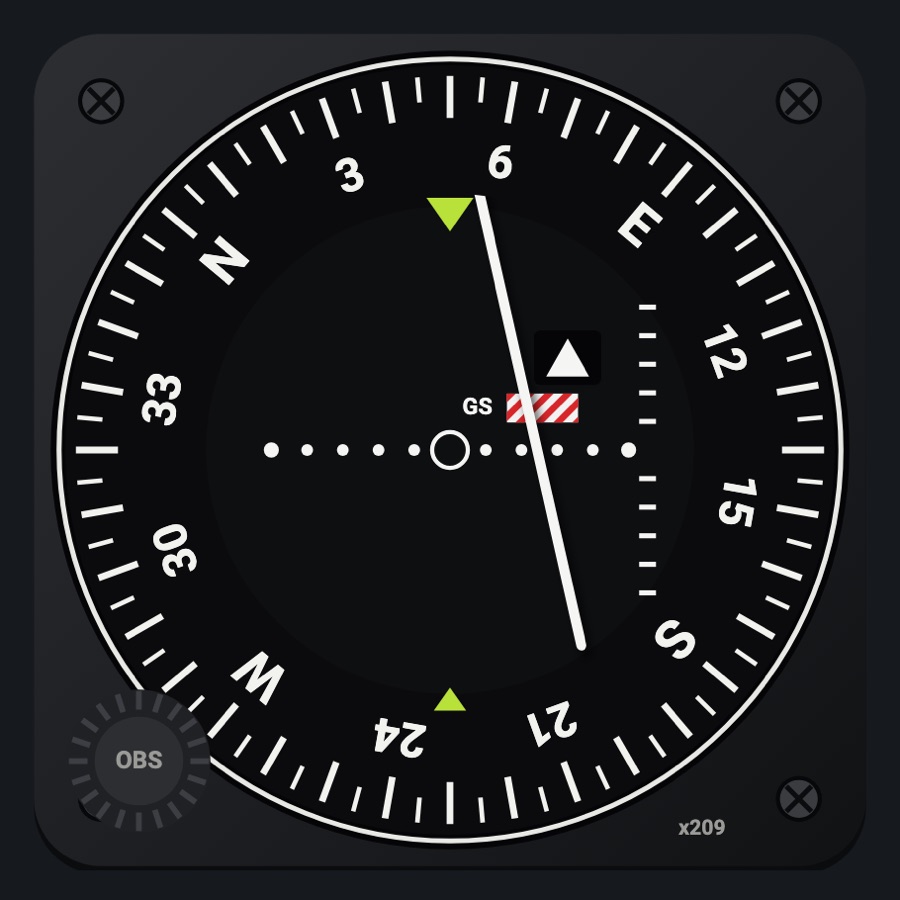
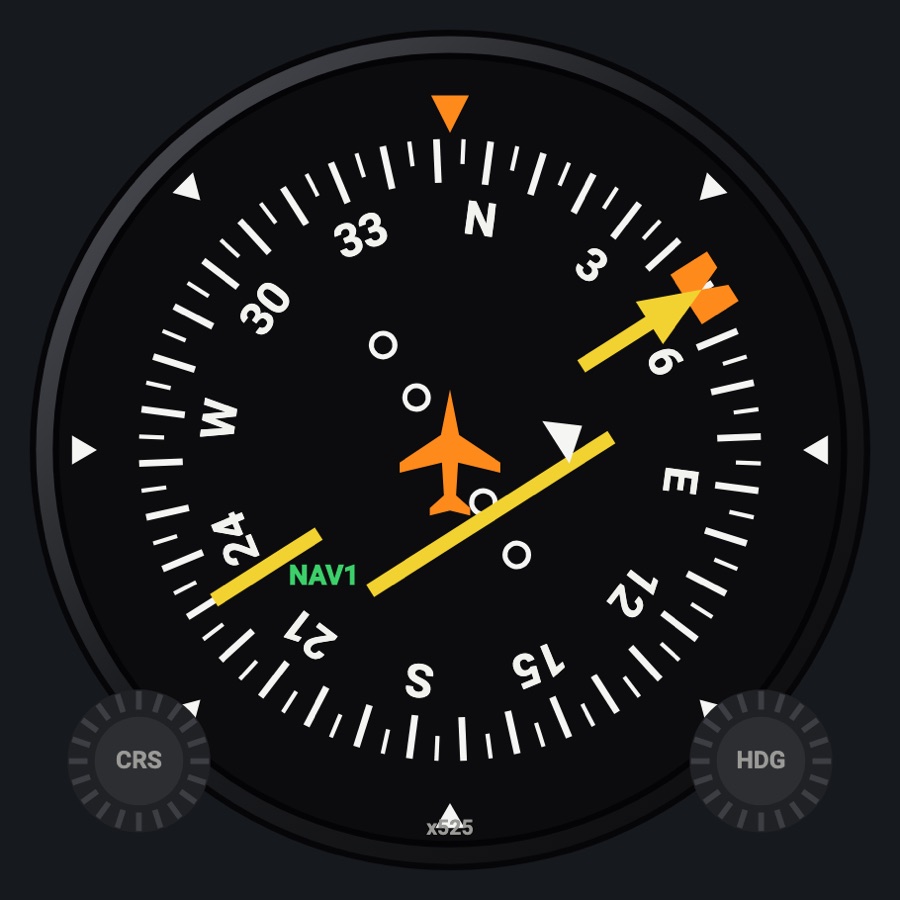
A VOR/ILS head with an OBS-turned azimuth card, a hinged CDI needle and glideslope needle, TO/FROM, and striped NAV and GS flags. Set it to NAV 1, NAV 2 or the GPS; the OBS knob sets that receiver's course in the simulator.
- Modeled on
- KI 209-style VOR/ILS indicator (square case)
- Category
- Flight instruments
- Size
- 1 cell
- Version
- 1.0 · 2026-10-19
- Plan
- Pro
- Simulators
- MSFS 2020 · MSFS 2024 · X-Plane 11 · X-Plane 12
Variants
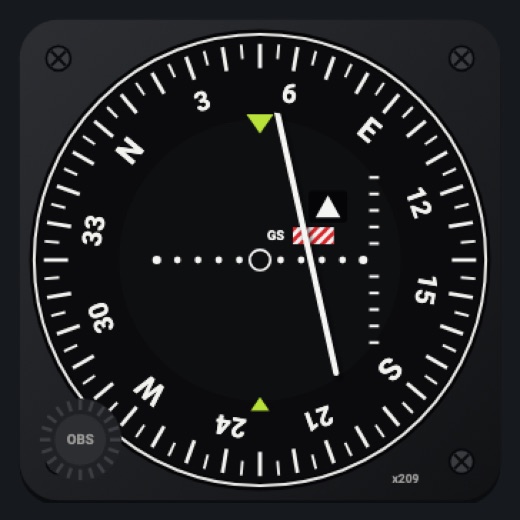
NAV 1v1.0
NAV 1 course, needle, TO/FROM and glideslope; follows the GPS (labeled GPS in magenta) when the GPS drives the CDI.
Instrument picker > RECEIVER > NAV 1
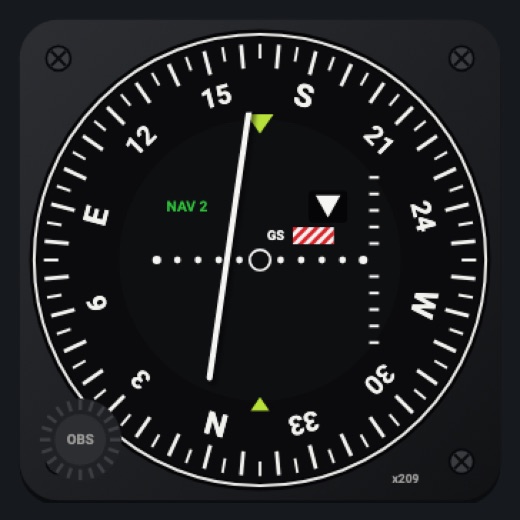
NAV 2v1.0
NAV 2 OBS, needle and TO/FROM, labeled NAV 2; no glideslope.
RECEIVER > NAV 2
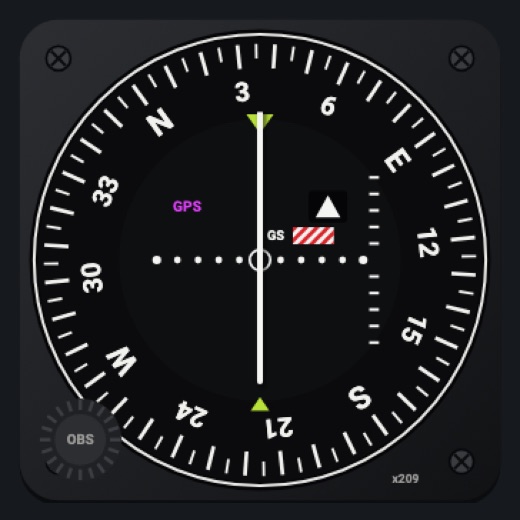
GPSv1.0
The GPS desired track and its deviation, labeled GPS; the GPS sets its own course (OBS knob inactive).
RECEIVER > GPS
Features
- Azimuth card turned by the OBS under a lime course index
- CDI needle hinged at the top and glideslope needle hinged at the left, swinging as on the real one (5 dots each side)
- TO / FROM triangle window
- Red-and-white striped NAV flag without a station and GS flag without a glideslope
- Receiver label (GPS / NAV 2) on the face when not plain NAV 1
- Red X when the selected receiver's course is missing
- Power-on self-test when the aircraft's avionics come on (about 3.6 s): the CDI swings full left and right, then the glideslope needle full up and down, the flags pull out (TO, then FROM) and drop back, then it reads its receiver
- Night lighting: the face takes the panel's red flood light, the glareshield's warm light from above (stronger for instruments higher on the page) and its own light, a lamp hidden at the top of the case lighting the dial downward (Settings > Dimmers: Red flood light, Glareshield, Instruments (analog))
On the iPad
- Drag the OBS knob (lower left) up or down to turn the course; double tap it to center the needle (course to the station)
- On the GPS receiver the knob does nothing
- Tap elsewhere on the face to change the instrument
Settings
- Receiver: NAV 1 / NAV 2 / GPS (instrument picker)
Keys and controllers
Map any of these to a key, a game controller's button or axis, or a MIDI knob (how):
- Course +
- Course -
- Course sync
- NAV 2 course +
- NAV 2 course -
- NAV 2 course sync
Simulator data
What the Hub reads from the simulator for this instrument, and what the instrument sends back. Names are the simulators' own: MSFS SimVars and events, X-Plane datarefs and commands.
Reads
| Value | MSFS | X-Plane |
|---|---|---|
| Course shown on the HSI (deg) | GPS WP DESIRED TRACK (degrees)NAV OBS:1 (degrees)GPS DRIVES NAV1 (bool) | sim/cockpit2/radios/actuators/hsi_obs_deg_mag_pilot |
| Course deviation, + = course to the right (dots (-2.5..2.5)) | HSI CDI NEEDLE (number) | sim/cockpit2/radios/indicators/hsi_hdef_dots_pilot |
| TO/FROM flag: 0 off, 1 TO, 2 FROM (enum) | HSI TF FLAGS (enum) | sim/cockpit2/radios/indicators/hsi_flag_from_to_pilot |
| CDI needle valid (1/0) (bool) | HSI CDI NEEDLE VALID (bool) | sim/cockpit2/radios/indicators/hsi_flag_from_to_pilot |
| Glideslope valid (1/0) (bool) | HSI GSI NEEDLE VALID (bool) | sim/cockpit2/radios/indicators/hsi_flag_glideslope_pilot |
| Glideslope deviation (dots) | HSI GSI NEEDLE (number) | sim/cockpit2/radios/indicators/hsi_vdef_dots_pilot |
| Distance to the station / waypoint (HSI) (nm) | HSI DISTANCE (nautical miles) | sim/cockpit2/radios/indicators/hsi_dme_distance_nm_pilot |
| CDI/HSI navigation source: 0 GPS, 1 NAV (enum) | GPS DRIVES NAV1 (bool) | sim/cockpit2/radios/actuators/HSI_source_select_pilot |
| NAV2 OBS course (deg) | NAV OBS:2 (degrees) | sim/cockpit2/radios/actuators/nav2_obs_deg_mag_pilot |
| NAV2 receiver course deviation, + = course right (dots (-2.5..2.5)) | NAV CDI:2 (number) | sim/cockpit2/radios/indicators/nav2_hdef_dots_pilot |
| NAV2 TO/FROM: 0 off, 1 TO, 2 FROM (enum) | NAV TOFROM:2 (enum) | sim/cockpit2/radios/indicators/nav2_flag_from_to_pilot |
| NAV2 receiving a station (1/0) (bool) | NAV HAS NAV:2 (bool) | sim/cockpit2/radios/indicators/nav2_flag_from_to_pilot |
| NAV2 station has DME (1/0) (bool) | NAV HAS DME:2 (bool) | sim/cockpit2/radios/indicators/nav2_has_dme |
| NAV2 DME distance (nm) | NAV DME:2 (nautical miles)NAV HAS DME:2 (bool) | sim/cockpit2/radios/indicators/nav2_dme_distance_nmsim/cockpit2/radios/indicators/nav2_has_dme |
| GPS desired track (deg) | GPS WP DESIRED TRACK (degrees)GPS IS ACTIVE FLIGHT PLAN (bool) | Not available |
| GPS's own course deviation (dots) | GPS CDI NEEDLE (number) | sim/cockpit2/radios/indicators/gps_hdef_dots_pilot |
| GPS flight plan active (1/0) (bool) | GPS IS ACTIVE FLIGHT PLAN (bool) | Not available |
| Distance to the active waypoint (nm) | GPS WP DISTANCE (nautical miles)GPS IS ACTIVE FLIGHT PLAN (bool) | Not available |
Sends
| When you… | MSFS | X-Plane |
|---|---|---|
| Dragging the OBS knob on NAV 1, or mapped 'Course +' / '-' | VOR1_SET | sim/cockpit2/radios/actuators/nav1_obs_deg_mag_pilotsim/cockpit2/radios/actuators/hsi_obs_deg_mag_pilot (also, when HSI_source_select_pilot == 0) |
| Double tap on the OBS knob on NAV 1, or mapped 'Course sync' | VOR1_SET | sim/cockpit2/radios/actuators/nav1_obs_deg_mag_pilotsim/cockpit2/radios/actuators/hsi_obs_deg_mag_pilot (when HSI shows NAV1) |
| Dragging the OBS knob on NAV 2, or mapped 'NAV 2 course +' / '-' | VOR2_SET | sim/cockpit2/radios/actuators/nav2_obs_deg_mag_pilotsim/cockpit2/radios/actuators/hsi_obs_deg_mag_pilot (also, when HSI_source_select_pilot == 1) |
| Double tap on the OBS knob on NAV 2, or mapped 'NAV 2 course sync' | VOR2_SET | sim/cockpit2/radios/actuators/nav2_obs_deg_mag_pilotsim/cockpit2/radios/actuators/hsi_obs_deg_mag_pilot (when HSI shows NAV2) |
Add-on aircraft with their own systems may use other variables; the Hub reads the standard ones.
Changes
The instrument's version counts what its faces share (the case, the mechanism, the data, the sounds); a face's own version counts that face alone.
- 1.0 2026-10-19
- First numbered version.