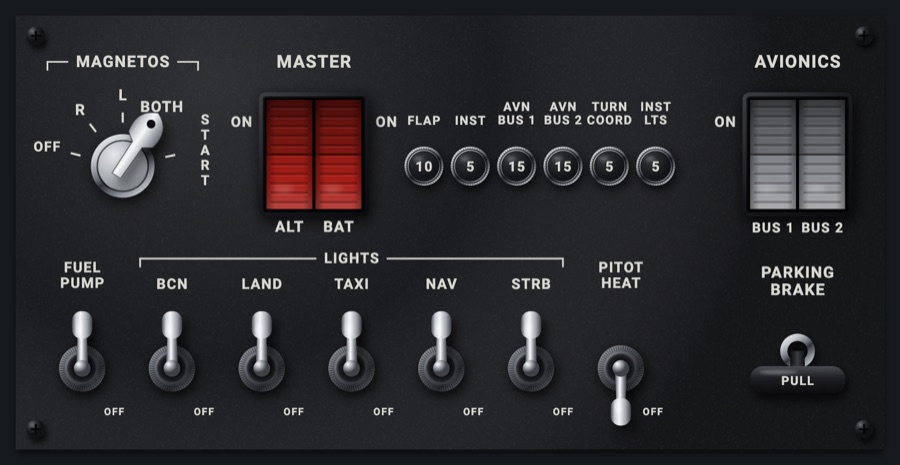
C152 switch panel
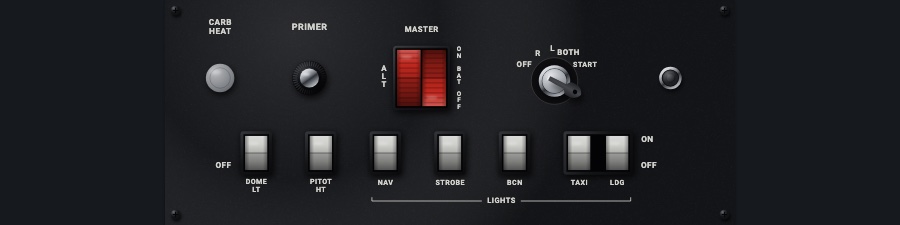
The 152's lower panel, its long strip folded into two rows: the CARB HEAT knob, the PRIMER, the red split MASTER rocker, the key and the lighter on top; the DOME LT, PITOT HT and LIGHTS rockers below. Each switch sets the simulator's and shows where the simulator has it.
- Modeled on
- Cessna 152 lower switch panel
- Category
- Airframe
- Size
- 2 × 1 cells
- Version
- 1.0 · 2026-10-19
- Plan
- Pro
- Simulators
- MSFS 2020 · MSFS 2024 · X-Plane 11 · X-Plane 12
Features
- CARB HEAT knob: pulled, the carburetor heat on; pushed home, off
- Key with OFF, R, L, BOTH, START; START is held (re-sent every 0.3 s while held) and springs back to BOTH when let go
- Red split MASTER rocker, ALT and BAT, interlocked as the real ones: ALT on takes BAT on, BAT off takes ALT off
- Rockers in black bezels with white paddles, OFF / ON printed at the ends: DOME LT, PITOT HT, and the LIGHTS (NAV, STROBE, BCN, TAXI, LDG) in one bezel
- No simulator counterpart: the PRIMER (pulled while held, then pushed home), the DOME LT rocker and the lighter (pushed in, it pops back out after a few seconds)
- Each switch shows what you set at once, then follows the simulator
- Click sound and haptic on every switch; the panel widens to fill its two cells and takes the red flood light at night
On the iPad
- Touch the CARB HEAT knob to pull or push it, or drag it down to pull and up to push
- Touch a key position, or drag the key round to it; hold at START to crank, release to spring back to BOTH
- Tap the ALT or BAT half of MASTER to toggle it; swipe up for on, down for off
- Tap a rocker (PITOT HT, NAV, STROBE, BCN, TAXI, LDG) to flip it; swipe up for on, down for off
- Pull the PRIMER and let it go; push the lighter in
Simulator data
What the Hub reads from the simulator for this instrument, and what the instrument sends back. Names are the simulators' own: MSFS SimVars and events, X-Plane datarefs and commands.
Reads
| Value | MSFS | X-Plane |
|---|---|---|
| Magneto switch: 0 off, 1 right, 2 left, 3 both, 4 start (enum) | RECIP ENG LEFT MAGNETO:1 (bool)RECIP ENG RIGHT MAGNETO:1 (bool)GENERAL ENG STARTER:1 (bool) | sim/cockpit2/engine/actuators/ignition_key[0] |
| Battery master (1/0) (bool) | ELECTRICAL MASTER BATTERY (bool) | sim/cockpit2/electrical/battery_on[0] |
| Alternator switch (1/0) (bool) | GENERAL ENG MASTER ALTERNATOR:1 (bool) | sim/cockpit2/electrical/generator_on[0] |
| Carburetor heat on (1/0) (bool) | GENERAL ENG ANTI ICE POSITION:1 (bool) | sim/cockpit2/engine/actuators/carb_heat_ratio[0] |
| Pitot heat switch (1/0) (bool) | PITOT HEAT (bool) | sim/cockpit2/ice/ice_pitot_heat_on_pilot |
| Nav lights switch (1/0) (bool) | LIGHT NAV (bool) | sim/cockpit2/switches/navigation_lights_on |
| Strobe lights switch (1/0) (bool) | LIGHT STROBE (bool) | sim/cockpit2/switches/strobe_lights_on |
| Beacon light switch (1/0) (bool) | LIGHT BEACON (bool) | sim/cockpit2/switches/beacon_on |
| Taxi light switch (1/0) (bool) | LIGHT TAXI (bool) | sim/cockpit2/switches/taxi_light_on |
| Landing light switch (1/0) (bool) | LIGHT LANDING (bool) | sim/cockpit2/switches/landing_lights_on |
Sends
| When you… | MSFS | X-Plane |
|---|---|---|
| Turning the key: 0 OFF, 1 R, 2 L, 3 BOTH, 4 START (repeated every 0.3 s while held; 3 sent on release) | MAGNETO1_OFFMAGNETO1_RIGHTMAGNETO1_LEFTMAGNETO1_BOTHMAGNETO1_STARTSET_STARTER1_HELD | sim/cockpit2/engine/actuators/ignition_key[0]command held: sim/starters/engage_starter_1 |
| CARB HEAT, the MASTER halves and the rockers: SwitchBit index * 2 + 1 (on) or + 0 (off) | TOGGLE_MASTER_BATTERYTOGGLE_MASTER_ALTERNATORTOGGLE_BEACON_LIGHTSLANDING_LIGHTS_TOGGLETOGGLE_TAXI_LIGHTSTOGGLE_NAV_LIGHTSSTROBES_TOGGLEPITOT_HEAT_TOGGLEANTI_ICE_TOGGLE_ENG1 | sim/cockpit2/electrical/battery_on[0]sim/cockpit2/electrical/generator_on[0]sim/cockpit2/switches/beacon_onsim/cockpit2/switches/landing_lights_onsim/cockpit2/switches/taxi_light_onsim/cockpit2/switches/navigation_lights_onsim/cockpit2/switches/strobe_lights_onsim/cockpit2/ice/ice_pitot_heat_on_pilotsim/cockpit2/engine/actuators/carb_heat_ratio[0] |
Add-on aircraft with their own systems may use other variables; the Hub reads the standard ones.
Changes
The instrument's version counts what its faces share (the case, the mechanism, the data, the sounds); a face's own version counts that face alone.
- 1.0 2026-10-19
- First numbered version.