C172 switch panel
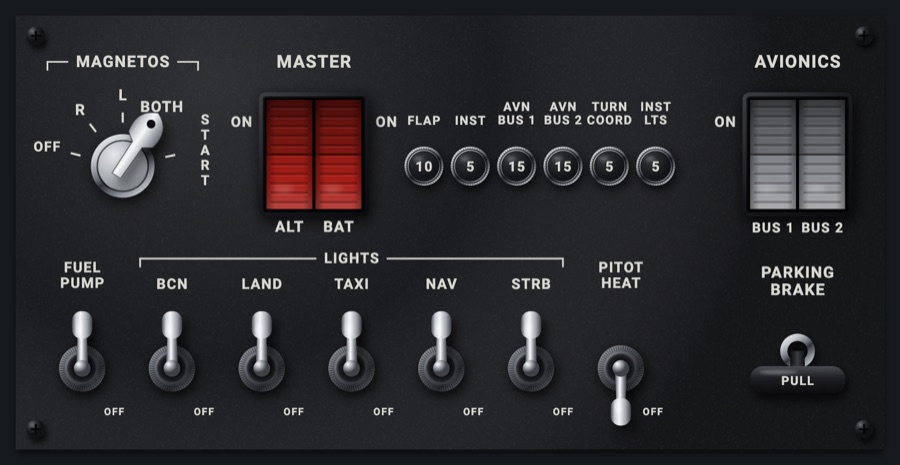
The 172's lower switch panel: the MAGNETOS key, the red MASTER rocker (ALT / BAT), circuit breakers, the gray AVIONICS rocker, the FUEL PUMP, light and PITOT HEAT toggles and the PARKING BRAKE handle. Every switch sets the simulator's and shows where the simulator has it.
- Modeled on
- Cessna 172 lower switch panel
- Category
- Airframe
- Size
- 2 × 1 cells
- Version
- 1.0 · 2026-10-19
- Plan
- Pro
- Simulators
- MSFS 2020 · MSFS 2024 · X-Plane 11 · X-Plane 12
Features
- MAGNETOS key lock with OFF, R, L, BOTH, START; START is held (re-sent every 0.3 s while held) and springs back to BOTH when let go
- Red split MASTER rocker: ALT and BAT halves, each its own switch, drawn pressed in or standing out
- Gray AVIONICS rocker (BUS 1 / BUS 2) as one avionics master
- Seven chrome toggles: FUEL PUMP, the LIGHTS group (BCN, LAND, TAXI, NAV, STRB), PITOT HEAT
- PARKING BRAKE T-handle: pulled out with SET shown when set
- Six circuit breakers (FLAP 10, INST 5, AVN BUS 1 15, AVN BUS 2 15, TURN COORD 5, INST LTS 5), decorative
- Each switch shows what you set at once, then follows the simulator (held up to 2.5 s until it agrees)
- Click sound and haptic on every switch; matte grained panel finish with chrome and contact shadows
- Widens to fill its two cells; at night the panel takes the flood light
On the iPad
- Touch a magneto position, or drag the key round to it; hold at START to crank, release to spring back to BOTH
- Tap the ALT or BAT half of MASTER to toggle it; swipe up for on, down for off
- Tap a toggle (FUEL PUMP, BCN, LAND, TAXI, NAV, STRB, PITOT HEAT) to flip it; swipe up for on, down for off
- Tap AVIONICS to toggle both buses; swipe up for on, down for off
- Tap PARKING BRAKE to set or release it; swipe down to pull (set), up to push (release)
Simulator data
What the Hub reads from the simulator for this instrument, and what the instrument sends back. Names are the simulators' own: MSFS SimVars and events, X-Plane datarefs and commands.
Reads
| Value | MSFS | X-Plane |
|---|---|---|
| Magneto switch: 0 off, 1 right, 2 left, 3 both, 4 start (enum) | RECIP ENG LEFT MAGNETO:1 (bool)RECIP ENG RIGHT MAGNETO:1 (bool)GENERAL ENG STARTER:1 (bool) | sim/cockpit2/engine/actuators/ignition_key[0] |
| Battery master (1/0) (bool) | ELECTRICAL MASTER BATTERY (bool) | sim/cockpit2/electrical/battery_on[0] |
| Alternator switch (1/0) (bool) | GENERAL ENG MASTER ALTERNATOR:1 (bool) | sim/cockpit2/electrical/generator_on[0] |
| Fuel pump switch (1/0) (bool) | GENERAL ENG FUEL PUMP SWITCH:1 (bool) | sim/cockpit2/engine/actuators/fuel_pump_on[0] |
| Beacon light switch (1/0) (bool) | LIGHT BEACON (bool) | sim/cockpit2/switches/beacon_on |
| Landing light switch (1/0) (bool) | LIGHT LANDING (bool) | sim/cockpit2/switches/landing_lights_on |
| Taxi light switch (1/0) (bool) | LIGHT TAXI (bool) | sim/cockpit2/switches/taxi_light_on |
| Nav lights switch (1/0) (bool) | LIGHT NAV (bool) | sim/cockpit2/switches/navigation_lights_on |
| Strobe lights switch (1/0) (bool) | LIGHT STROBE (bool) | sim/cockpit2/switches/strobe_lights_on |
| Pitot heat switch (1/0) (bool) | PITOT HEAT (bool) | sim/cockpit2/ice/ice_pitot_heat_on_pilot |
| Avionics master (1/0) (bool) | AVIONICS MASTER SWITCH (bool) | sim/cockpit2/switches/avionics_power_on |
| Parking brake set (1/0) (bool) | BRAKE PARKING POSITION (bool) | sim/cockpit2/controls/parking_brake_ratio |
Sends
| When you… | MSFS | X-Plane |
|---|---|---|
| Turning the key: 0 OFF, 1 R, 2 L, 3 BOTH, 4 START (repeated every 0.3 s while held; 3 sent on release) | MAGNETO1_OFFMAGNETO1_RIGHTMAGNETO1_LEFTMAGNETO1_BOTHMAGNETO1_STARTSET_STARTER1_HELD | sim/cockpit2/engine/actuators/ignition_key[0]command held: sim/starters/engage_starter_1 |
| Any rocker, toggle or the parking brake: SwitchBit index * 2 + 1 (on) or + 0 (off) | TOGGLE_MASTER_BATTERYTOGGLE_MASTER_ALTERNATORTOGGLE_ELECT_FUEL_PUMP1TOGGLE_BEACON_LIGHTSLANDING_LIGHTS_TOGGLETOGGLE_TAXI_LIGHTSTOGGLE_NAV_LIGHTSSTROBES_TOGGLEPITOT_HEAT_TOGGLETOGGLE_AVIONICS_MASTERPARKING_BRAKES | sim/cockpit2/electrical/battery_on[0]sim/cockpit2/electrical/generator_on[0]sim/cockpit2/engine/actuators/fuel_pump_on[0]sim/cockpit2/switches/beacon_onsim/cockpit2/switches/landing_lights_onsim/cockpit2/switches/taxi_light_onsim/cockpit2/switches/navigation_lights_onsim/cockpit2/switches/strobe_lights_onsim/cockpit2/ice/ice_pitot_heat_on_pilotsim/cockpit2/switches/avionics_power_onsim/cockpit2/controls/parking_brake_ratio |
Add-on aircraft with their own systems may use other variables; the Hub reads the standard ones.
Changes
The instrument's version counts what its faces share (the case, the mechanism, the data, the sounds); a face's own version counts that face alone.
- 1.0 2026-10-19
- First numbered version.