KLN 89B-style GPS
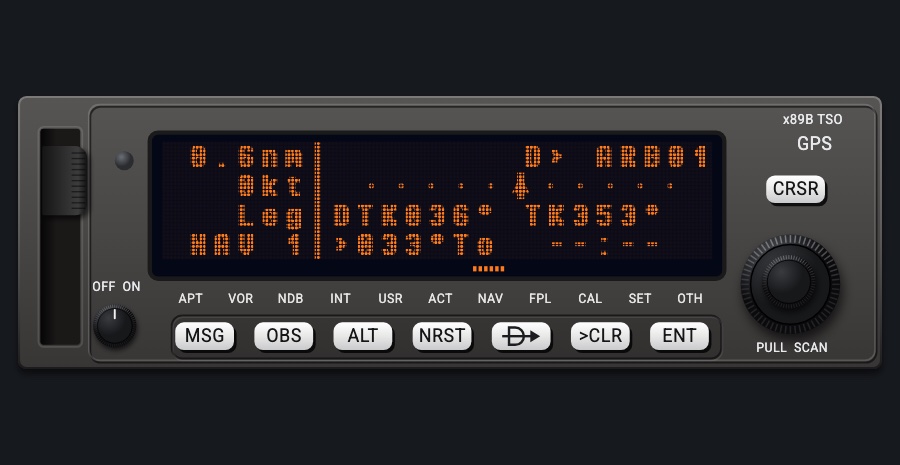
A panel-mount GPS in the style of the Bendix/King KLN 89B, drawn after its Pilot's Guide: the data-card slot, the amber dot-matrix display and the PULL SCAN knobs. It shows the leg, a CDI, position, times, a small map, the flight plan and the nearest airports, VORs and NDBs, and flies Direct-To in the app's own flight plan.
- Modeled on
- Bendix/King KLN 89B-style panel GPS
- Category
- Displays
- Size
- 2 × 1 cells
- Version
- 1.0 · 2026-10-19
- Plan
- Pro
- Simulators
- MSFS 2020 · MSFS 2024 · X-Plane 11 · X-Plane 12
Features
- Amber gas-plasma style dot matrix, four lines: a 6-character navigation area on the left (distance to the active waypoint, its ident or the ground speed, Leg / OBS, the page name), a divider, and the page on the right
- Page types printed under the display (APT VOR NDB INT USR ACT NAV FPL CAL SET OTH), with a dotted amber bar under the one shown
- NAV 1: the leg (D> waypoint or from > to), a 5-dot CDI with a TO triangle (from the GPS deviation), DTK and TK, bearing to the waypoint and ETE
- NAV 2 present position (lat/lon); NAV 3 UTC time, departure time, ETA and flight time; NAV 4 a north-up map of the flight plan's legs and points with the aircraft diamond, auto-ranging 5 to 500 nm
- FPL 0 / ACT: the flight plan's waypoints with the distance to each, the active one marked
- APT pages for the nearest airports: ident, elevation and name with bearing and distance (APT 1), position (APT 2-3), runways and lengths (APT 4), frequencies (APT 5); VOR 1 and NDB 1 list the nearest with frequency, bearing and distance
- CAL pages (distance and bearing to the active waypoint, TAS from IAS and OAT, pressure altitude), SET (initial position, date/time) and OTH (GPS status, software) pages
- D->: DIRECT TO with the page's waypoint (or the active one) prefilled; CRSR to edit the ident letter by letter; ENT looks it up in the offline database (nearest match) and makes it the app's Direct-To; 'No Such Wpt' if not found
- NRST, MSG ('No Messages') and ALT (the baro setting) pages; OBS toggles Leg / OBS (shows the OBS course)
- At night the faceplate, keys and knobs take the red flood light while the display keeps its amber, dimmed
On the iPad
- Drag around the right dual knob: the outer ring picks the page type, the inner knob the page (on VOR / NDB, or APT while scanning, it steps to the next nearest one)
- Hold the right knob (PULL SCAN): toggles scan mode, where the inner knob scans the nearby airports
- With the cursor on in DIRECT TO: outer ring moves the cursor, inner knob changes the letter
- Tap D-> for DIRECT TO, CRSR to start/stop editing the ident, ENT to fly it
- Tap NRST then ENT to jump to the nearest airports (APT, scanning)
- Tap MSG or ALT to show (and tap again to leave) those pages; tap OBS to switch Leg / OBS
- >CLR: cursor off, else leaves the overlay page, else ends scanning
- Tap the OFF/ON knob to turn the unit off and on (display blank when off)
Simulator data
What the Hub reads from the simulator for this instrument, and what the instrument sends back. Names are the simulators' own: MSFS SimVars and events, X-Plane datarefs and commands.
Reads
| Value | MSFS | X-Plane |
|---|---|---|
| Aircraft latitude (deg) | PLANE LATITUDE (degrees) | sim/flightmodel/position/latitude |
| Aircraft longitude (deg) | PLANE LONGITUDE (degrees) | sim/flightmodel/position/longitude |
| Active waypoint latitude (deg) | GPS WP NEXT LAT (degrees)GPS IS ACTIVE FLIGHT PLAN (bool) | Not available |
| Active waypoint longitude (deg) | GPS WP NEXT LON (degrees)GPS IS ACTIVE FLIGHT PLAN (bool) | Not available |
| Text: active (next) waypoint ident (text) | GPS WP NEXT ID (string8) | Not available |
| Magnetic variation, + east (magnetic = true - variation) (deg) | MAGVAR (degrees) | sim/flightmodel/position/magnetic_variation |
| Ground speed (kt) | GPS GROUND SPEED (knots) | sim/flightmodel/position/groundspeed |
| Ground track (deg magnetic) | GPS GROUND MAGNETIC TRACK (degrees) | sim/cockpit2/gauges/indicators/ground_track_mag_pilot |
| GPS desired track (deg) | GPS WP DESIRED TRACK (degrees)GPS IS ACTIVE FLIGHT PLAN (bool) | Not available |
| Course shown on the HSI (deg) | GPS WP DESIRED TRACK (degrees)NAV OBS:1 (degrees)GPS DRIVES NAV1 (bool) | sim/cockpit2/radios/actuators/hsi_obs_deg_mag_pilot |
| GPS's own course deviation (dots) | GPS CDI NEEDLE (number) | sim/cockpit2/radios/indicators/gps_hdef_dots_pilot |
| Sim UTC time, seconds since midnight (s) | ZULU TIME (seconds) | sim/time/zulu_time_sec |
| Altimeter setting (inHg) | KOHLSMAN SETTING HG (inHg) | sim/cockpit2/gauges/actuators/barometer_setting_in_hg_pilot |
| Indicated airspeed (kt) | AIRSPEED INDICATED (knots) | sim/cockpit2/gauges/indicators/airspeed_kts_pilot |
| Outside air temperature (degC) | AMBIENT TEMPERATURE (celsius) | sim/cockpit2/temperature/outside_air_temp_degc |
| True airspeed (kt) | AIRSPEED TRUE (knots) | sim/flightmodel/position/true_airspeed |
| Pressure altitude (ft) | PRESSURE ALTITUDE (feet) | sim/flightmodel2/position/pressure_altitude |
Add-on aircraft with their own systems may use other variables; the Hub reads the standard ones.
Changes
The instrument's version counts what its faces share (the case, the mechanism, the data, the sounds); a face's own version counts that face alone.
- 1.0 2026-10-19
- First numbered version.