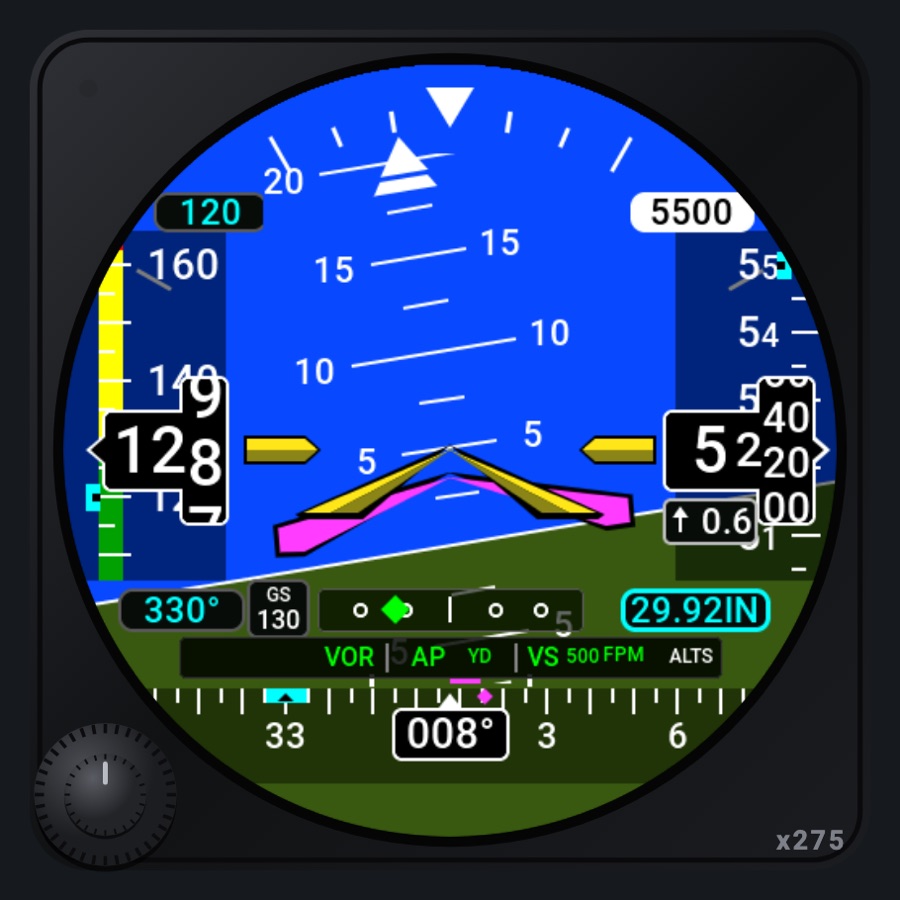
NEXT flight display
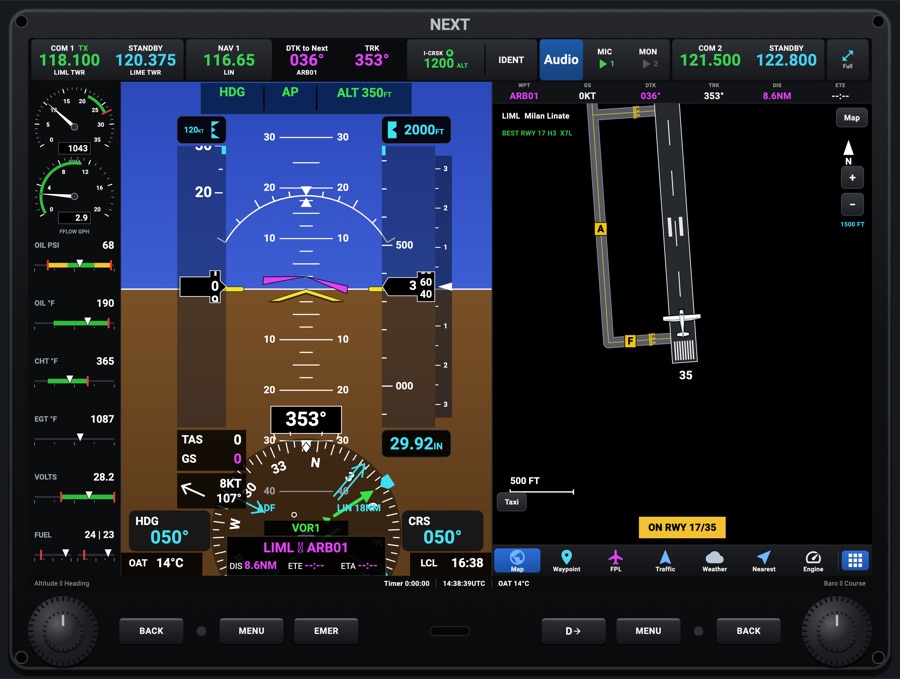
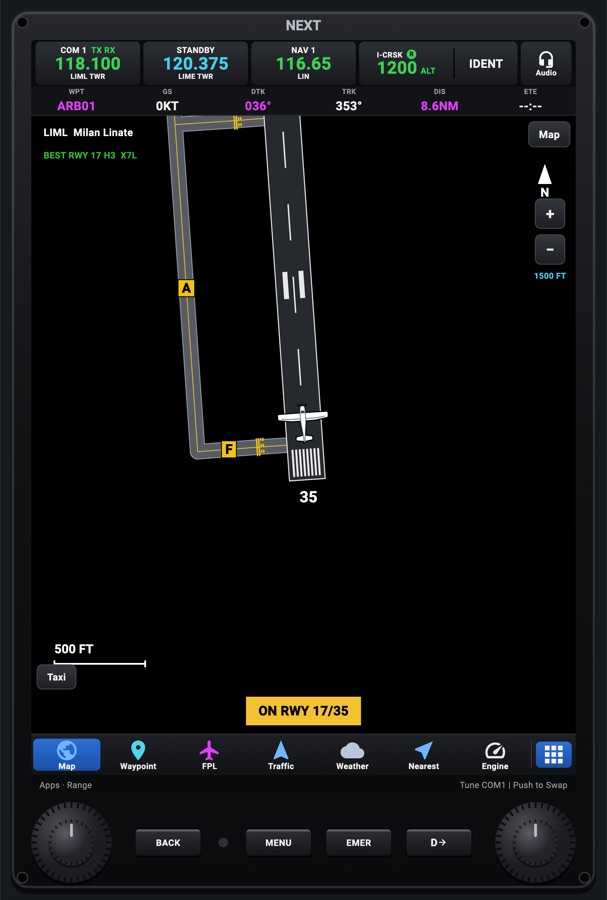
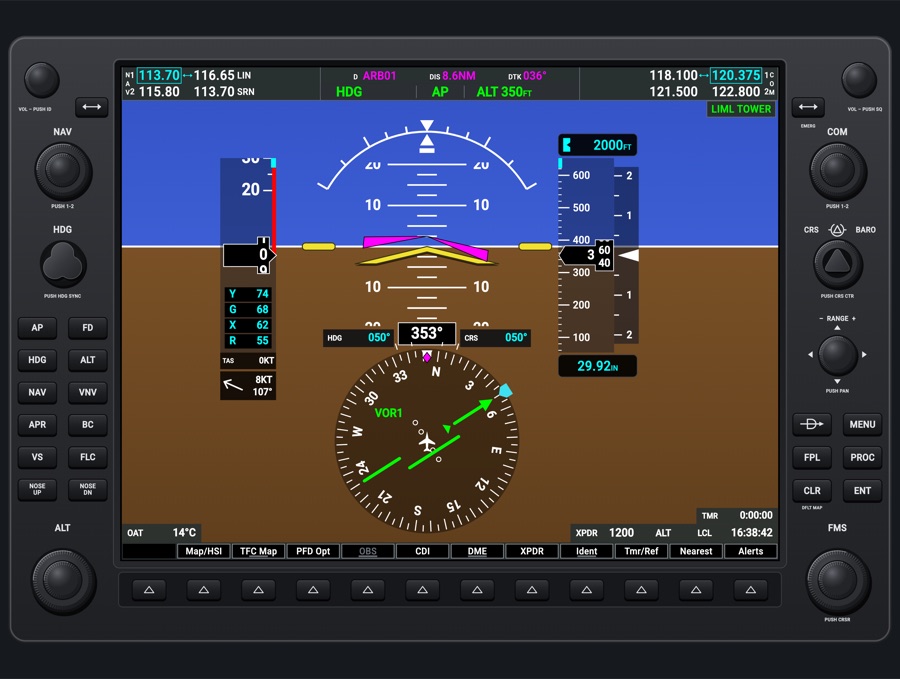
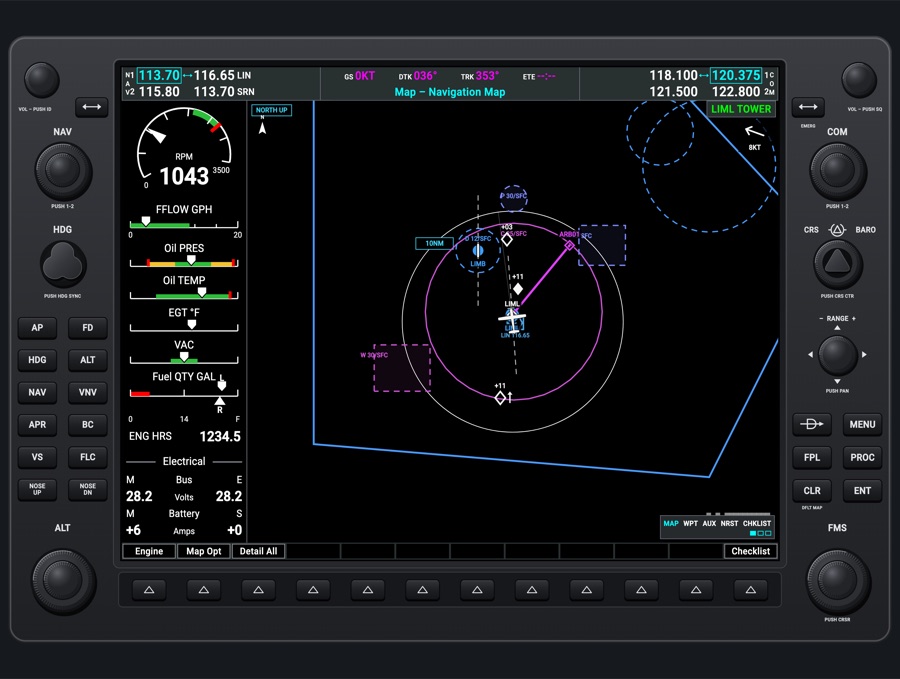
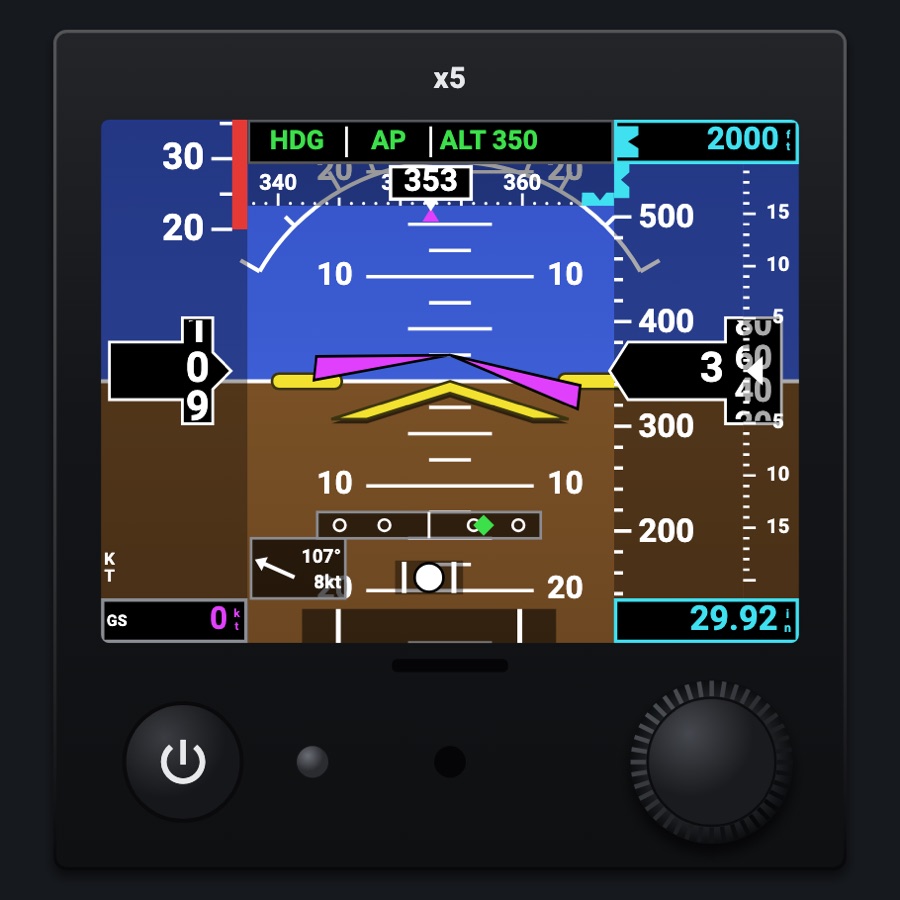
A landscape glass flight display: a full-window attitude with synthetic vision, airspeed and altitude tapes, vertical speed, an HSI, the autopilot's modes and crew alerts, with the radios and transponder along a top bar. Split, the NEXT navigator (MapLibre map, flight plan, weather, traffic, nearest and the other apps) runs beside the PFD; full, the PFD takes the whole screen with an inset map and the active waypoint.
- Modeled on
- Garmin AXIS-style integrated flight display (landscape PFD with the navigator beside it)
- Category
- Displays
- Size
- 4 × 3 cells
- Version
- 1.0 · 2026-10-20
- Plan
- Pro
- Simulators
- MSFS 2020 · MSFS 2024 · X-Plane 11 · X-Plane 12
Variants
Splitv1.0
The PFD on the left and the navigator's data bar, app (Map, Waypoint, FPL, Traffic, Weather, Nearest, Engine...) and app bar on the right; held upright, the PFD sits over the apps. Default.
The Split / Full key at the right of the top bar, or PFW Menu > Display (not on a phone)
Fullv1.0
The PFD over the whole screen, with the inset map left of the airspeed tape and the active waypoint box (ident, DIS, DTK, ETE) right of the vertical speed. A window opened while full splits the screen temporarily.
The Split / Full key, or PFW Menu > Display
Synthetic vision onv1.0
3D terrain ahead from elevation tiles, lit as a hillshade, with lakes and rivers blue; terrain turns yellow (TERRAIN AHEAD) or red (PULL UP) only where it causes an active terrain alert. Runways with markings, the simulator's taxiways with signs and hold-short lines, stands and pavement around the aircraft, airport flags, plan waypoint flags, traffic, a flight path marker and pathway boxes at the altimeter's altitude. Default on.
PFW Menu > Synthetic Vision
Synthetic vision offv1.0
The classic blue-over-brown attitude.
PFW Menu > Synthetic Vision
SVT optionsv1.0
Map on Terrain (the vector map draped on the 3D terrain, sharp close in), Traffic Symbols, Field of View (Wide 44 / Normal 30 / Narrow 24 deg), Terrain Colors (Topographic, default, or Green).
PFW Menu > Map on Terrain, Traffic Symbols, Field of View, Terrain Colors
Engine stripv1.1
A column of engine values down the PFD's left (RPM and MAN or fuel flow on small dials, then a row per value with a thin bar: oil, CHT, EGT, both tanks on one row, volts), drawn like certified engine indicators; display only (no touch).
PFW Menu > Engine Strip
Engine / Lean / System pagev1.0
A larger page over the PFD's left: ENGINE, LEAN (with Lean Find) or SYSTEM.
PFW Menu > Engine Page (the strip no longer opens it by touch)
Nightv1.0
Night colors on the PFD (navy sky, dark ground) when the panel's night lighting is on.
Panel lighting (night)
Metric / hPav1.0
Baro shown in hectopascals (and metric altitudes where supported) from the app's units.
App units settings
Phonev1.0
On a phone held upright the PFD is never split: its windows (autopilot, bug pads, radios) open over it as bottom sheets, the Split key and Display row are hidden, and its bars are 1.5x larger.
Automatic on a phone (Avionics > PFD, or the panel)
Avionics PFD viewv1.0
The flight display fills the Avionics screen's PFD view (touch only, no bezel).
Avionics > PFD
Features
- Attitude: full-window horizon with pitch ladder and roll scale, flight director command bars when the FD is on, red X 'ATTITUDE FAIL' when attitude data is lost
- Synthetic vision: 3D terrain with hillshade and water, terrain-alert colouring (yellow caution, red warning), runways as painted, taxiways and signs, pavement and stands near the aircraft, airport and waypoint flags, traffic (not within 250 ft; an amber arrow at the edge for an advisory outside the view), flight path marker and pathway boxes; optional map draped on the terrain
- Tapes: see-through airspeed tape with speed bands (white flaps, green, yellow, red past Vne) and selected-speed bug; altitude tape with selected-altitude bug and rolling digits; vertical speed scale; red X on airspeed/altitude if air data fails
- Trend vectors: magenta lines showing speed and altitude 6 seconds ahead; V-speed reference flags (R, X, Y, G) on the speed tape
- Settings boxes: selected speed above the speed tape, selected altitude above the altitude tape (inverted approaching within 1,000 ft, yellow when left by 200 ft), baro below (STD above 18,000 ft, flashing if not set to standard there); TAS and GS under the speed tape
- HSI: top half of the rose under the attitude, heading bug, course needle and deviation (GPS magenta, NAV green), track diamond, turn-rate vector, bearing pointers BRG1 (NAV 1) and BRG2 (ADF), navigation source and leg (FROM > TO, distance, time), heading and course boxes, XTK when off the leg
- TRAFFIC annunciation right of the airspeed tape on a traffic advisory (flashing 5 s, then steady; not while traffic alerts are inhibited); traffic in the same colours and altitude range as the map
- Wind box: arrow, direction and speed
- Approach: glideslope / GPS glidepath / VNAV path indicator beside the altitude tape, with LPV / ILS / LOC / GP label; marker beacons (O, M, I); VNAV top of descent and required vertical speed
- Baro minimums: MIN box under the baro and a MINIMUMS callout within 100 ft (yellow at or below)
- Autopilot: AFCS status box along the top (lateral mode, AP / YD, vertical mode with its reference, armed modes in white) and an Automatic Flight Control System window with FD, AP, YD, LVL, APR, NAV, HDG, IAS, VS, ALT and Nose Up/Down, Slower/Faster or Lower/Higher Alt keys
- Crew alerts (CAS): alerts window with a master WARNING / CAUTION tag, newest flashing until acknowledged, audible alerts; XPDR STBY annunciation; Smart Glide target and best glide speed
- Top bar: COM 1 / standby, NAV 1, DTK to Next and TRK, transponder and IDENT, Audio (with MIC and MON), COM 2 / standby, Split/Full; bottom: knob legends, timer, UTC time, OAT
- Full screen: inset map (track up, tap for range) and active waypoint box; split: the full NEXT navigator (MapLibre map, flight plan, Direct-To, waypoints, traffic page, weather, nearest, engine, charts...)
- Bezel: two dual knobs and BACK, MENU, EMER, Direct-To, MENU, BACK keys, as the real unit's defaults; Emergency window to tune 121.5 and squawk 7700
- Avionics knob/key actions and the navigator keys can be driven from external hardware (keyboard, controller, MIDI) via the input map
Your aircraft: The airspeed tape's colour bands and the V-speed references (R, X, Y, G) come from the aircraft profile's V-speeds; the engine strip and pages take their ranges and red lines from the aircraft's engine limits (manifold pressure only when the aircraft has it); generic aircraft identified by the Hub get engine pages for their type (piston, turboprop, jet, helicopter); the Vision Jet and the Citation CJ4 get their own engine strips, the CJ4's as its MFD's engine indication (N1 and ITT tapes for both engines, N2, oil, fuel in pounds, the generators, the battery, the cabin).
On the iPad
- Left dual knob: drag the outer ring for the selected altitude, the inner for the heading bug; tap to sync the heading bug
- Right dual knob: drag the outer ring for the baro, the inner for the course; tap for standard baro (29.92)
- Tap the selected speed, selected altitude, baro, heading or course box to open a bug pad: nudges (-10, -1, +1, +10), Sync / STD / Center, or type a value
- Tap the AFCS status box at the top to open the autopilot window
- The engine strip is display only; the Engine/Lean/System pages come from the PFW Menu
- Tap the CAS window to acknowledge alerts
- Tap the inset map (full screen) for the next range
- Top bar: tap COM 1 / COM 2 to swap, the standby or NAV 1 to type a frequency, the transponder for its window, Audio for the audio panel, MIC / MON to change the transmitting / monitored radio, Split/Full to switch
- Left MENU: PFW Menu; right MENU: the navigator's menu for the current app; EMER: emergency window; Direct-To key: Direct-To; BACK: close the window or back to the map
Settings
- Synthetic Vision: on / off (kept)
- Map on Terrain: on / off (kept)
- Traffic Symbols (SVT): on / off (kept)
- Field of View: Wide / Normal / Narrow (kept)
- Terrain Colors: Topographic / Green (kept)
- V-Speed References: on / off (kept)
- Display: Split / Full (not on a phone)
- CDI Source: GPS / NAV 1 (sends the sim's CDI source toggle)
- Bearing 1 (NAV 1): on / off (kept)
- Bearing 2 (ADF): on / off (kept)
- Engine Strip: on / off (kept)
- Engine Page: Off / Engine / Lean / System (Lean Find when on Lean)
- Baro Minimums: typed in feet, 0 = off (kept)
- Inset map range (tap the inset; kept)
- Units (app-wide): hPa baro, meters
Keys and controllers
Map any of these to a key, a game controller's button or axis, or a MIDI knob (how):
- COM 1 MHz +
- COM 1 MHz -
- COM 1 channel +
- COM 1 channel -
- COM 1 swap
- NAV 1 MHz +
- NAV 1 MHz -
- NAV 1 channel +
- NAV 1 channel -
- NAV 1 swap
- CDI: next source
- Course +
- Course -
- Course sync
- Heading bug +
- Heading bug -
- Heading bug sync
- Altitude +
- Altitude -
- Altitude sync
- Baro +
- Baro -
- Baro sync
- Direct-To
- MENU
- BACK (the NEXT)
- FPL
- PROC
- ENT
- CLR
- Large knob +
- Large knob -
- Small knob +
- Small knob -
- Knob push (cursor)
Simulator data
What the Hub reads from the simulator for this instrument, and what the instrument sends back. Names are the simulators' own: MSFS SimVars and events, X-Plane datarefs and commands.
Reads
| Value | MSFS | X-Plane |
|---|---|---|
| Pitch attitude, + nose up (deg) | ATTITUDE INDICATOR PITCH DEGREES (degrees) | sim/flightmodel/position/theta |
| Bank angle, + right wing down (deg) | ATTITUDE INDICATOR BANK DEGREES (degrees) | sim/flightmodel/position/phi |
| Indicated airspeed (kt) | AIRSPEED INDICATED (knots) | sim/cockpit2/gauges/indicators/airspeed_kts_pilot |
| True airspeed (kt) | AIRSPEED TRUE (knots) | sim/flightmodel/position/true_airspeed |
| Ground speed (kt) | GPS GROUND SPEED (knots) | sim/flightmodel/position/groundspeed |
| Indicated altitude (ft) | INDICATED ALTITUDE (feet) | sim/cockpit2/gauges/indicators/altitude_ft_pilot |
| True altitude (MSL) (ft) | PLANE ALTITUDE (feet) | sim/flightmodel/position/elevation |
| Vertical speed (fpm) | VERTICAL SPEED (feet per minute) | sim/cockpit2/gauges/indicators/vvi_fpm_pilot |
| Altimeter setting (inHg) | KOHLSMAN SETTING HG (inHg) | sim/cockpit2/gauges/actuators/barometer_setting_in_hg_pilot |
| Heading (glass AHRS heading, else magnetic heading) (deg magnetic) | HEADING INDICATOR (degrees) | sim/cockpit2/gauges/indicators/heading_AHARS_deg_mag_pilotsim/flightmodel/position/mag_psi |
| Ground track (deg magnetic) | GPS GROUND MAGNETIC TRACK (degrees) | sim/cockpit2/gauges/indicators/ground_track_mag_pilot |
| Slip/skid ball position, -1..1 | TURN COORDINATOR BALL (position) | sim/cockpit2/gauges/indicators/slip_deg |
| Turn rate, + right (turn coordinator) (deg/s) | TURN INDICATOR RATE (degrees per second) | sim/flightmodel/position/Qsim/flightmodel/position/Rsim/flightmodel/position/phisim/flightmodel/position/thetasim/cockpit2/gauges/indicators/turn_rate_heading_deg_pilot |
| Selected altitude (ft) | AUTOPILOT ALTITUDE LOCK VAR (feet) | sim/cockpit2/autopilot/altitude_dial_ft |
| Heading bug (deg) | AUTOPILOT HEADING LOCK DIR (degrees) | sim/cockpit2/autopilot/heading_dial_deg_mag_pilot |
| Selected airspeed (kt) | AUTOPILOT AIRSPEED HOLD VAR (knots) | sim/cockpit2/autopilot/airspeed_dial_kts_mach |
| Autopilot modes, one bit each (ApBit: ap, fd, yd, hdg, nav, apr, bc, alt, vs, flc, lvl, gs, vnv) (bitfield) | AUTOPILOT MASTER (bool)AUTOPILOT FLIGHT DIRECTOR ACTIVE (bool)AUTOPILOT YAW DAMPER (bool)AUTOPILOT HEADING LOCK (bool)AUTOPILOT NAV1 LOCK (bool)AUTOPILOT APPROACH HOLD (bool)AUTOPILOT BACKCOURSE HOLD (bool)AUTOPILOT ALTITUDE LOCK (bool)AUTOPILOT VERTICAL HOLD (bool)AUTOPILOT FLIGHT LEVEL CHANGE (bool)AUTOPILOT WING LEVELER (bool)AUTOPILOT GLIDESLOPE HOLD (bool) | sim/cockpit2/autopilot/servos_onsim/cockpit2/autopilot/flight_director_modesim/cockpit2/switches/yaw_damper_onsim/cockpit2/autopilot/heading_statussim/cockpit2/autopilot/nav_statussim/cockpit2/autopilot/approach_statussim/cockpit2/autopilot/backcourse_statussim/cockpit2/autopilot/altitude_hold_statussim/cockpit2/autopilot/vvi_statussim/cockpit2/autopilot/speed_statussim/cockpit2/autopilot/roll_statussim/cockpit2/autopilot/glideslope_status |
| Autopilot vertical speed target (fpm) | AUTOPILOT VERTICAL HOLD VAR (feet per minute) | sim/cockpit2/autopilot/vvi_dial_fpm |
| Flight director on (1/0) (bool) | AUTOPILOT FLIGHT DIRECTOR ACTIVE (bool) | sim/cockpit2/autopilot/flight_director_mode |
| Flight director pitch command (deg) | AUTOPILOT FLIGHT DIRECTOR PITCH (degrees) | sim/cockpit2/autopilot/flight_director_pitch_deg |
| Flight director bank command (deg) | AUTOPILOT FLIGHT DIRECTOR BANK (degrees) | sim/cockpit2/autopilot/flight_director_roll_deg |
| CDI/HSI navigation source: 0 GPS, 1 NAV (enum) | GPS DRIVES NAV1 (bool) | sim/cockpit2/radios/actuators/HSI_source_select_pilot |
| The NAV source is a localizer (1/0) (bool) | NAV HAS LOCALIZER:1 (bool)GPS DRIVES NAV1 (bool) | sim/cockpit2/radios/actuators/nav1_frequency_hzsim/cockpit2/radios/actuators/HSI_source_select_pilot |
| CDI needle valid (1/0) (bool) | HSI CDI NEEDLE VALID (bool) | sim/cockpit2/radios/indicators/hsi_flag_from_to_pilot |
| Course shown on the HSI (deg) | GPS WP DESIRED TRACK (degrees)NAV OBS:1 (degrees)GPS DRIVES NAV1 (bool) | sim/cockpit2/radios/actuators/hsi_obs_deg_mag_pilot |
| NAV1 OBS course (deg) | NAV OBS:1 (degrees) | sim/cockpit2/radios/actuators/nav1_obs_deg_mag_pilot |
| GPS desired track (deg) | GPS WP DESIRED TRACK (degrees)GPS IS ACTIVE FLIGHT PLAN (bool) | Not available |
| Text: active (next) waypoint ident (text) | GPS WP NEXT ID (string8) | Not available |
| Distance to the active waypoint (nm) | GPS WP DISTANCE (nautical miles)GPS IS ACTIVE FLIGHT PLAN (bool) | Not available |
| Text: previous waypoint ident (text) | GPS WP PREV ID (string8) | Not available |
| Marker beacon: 0 none, 1 outer, 2 middle, 3 inner (enum) | MARKER BEACON STATE (number) | sim/cockpit2/radios/indicators/outer_marker_litsim/cockpit2/radios/indicators/middle_marker_litsim/cockpit2/radios/indicators/inner_marker_lit |
| Wind from (deg true) | AMBIENT WIND DIRECTION (degrees) | sim/cockpit2/gauges/indicators/wind_heading_deg_magsim/flightmodel/position/magnetic_variation |
| Wind speed (kt) | AMBIENT WIND VELOCITY (knots) | sim/cockpit2/gauges/indicators/wind_speed_kts |
| Magnetic variation, + east (magnetic = true - variation) (deg) | MAGVAR (degrees) | sim/flightmodel/position/magnetic_variation |
| Outside air temperature (degC) | AMBIENT TEMPERATURE (celsius) | sim/cockpit2/temperature/outside_air_temp_degc |
| Sim local time, seconds since midnight (s) | LOCAL TIME (seconds) | sim/time/local_time_sec |
| Aircraft latitude (deg) | PLANE LATITUDE (degrees) | sim/flightmodel/position/latitude |
| Aircraft longitude (deg) | PLANE LONGITUDE (degrees) | sim/flightmodel/position/longitude |
| On the ground (1/0) (bool) | SIM ON GROUND (bool) | sim/flightmodel/failures/onground_any |
| NAV1 active frequency (kHz) | NAV ACTIVE FREQUENCY:1 (MHz) | sim/cockpit2/radios/actuators/nav1_frequency_hz |
| NAV1 standby frequency (kHz) | NAV STANDBY FREQUENCY:1 (MHz) | sim/cockpit2/radios/actuators/nav1_standby_frequency_hz |
| Text: NAV1 station ident (e.g. SEA) (text) | NAV IDENT:1 | Not available |
| NAV1 DME distance (nm) | NAV DME:1 (nautical miles)NAV HAS DME:1 (bool) | sim/cockpit2/radios/indicators/nav1_dme_distance_nmsim/cockpit2/radios/indicators/nav1_has_dme |
| NAV1 station has DME (1/0) (bool) | NAV HAS DME:1 (bool) | sim/cockpit2/radios/indicators/nav1_has_dme |
| NAV2 active frequency (kHz) | NAV ACTIVE FREQUENCY:2 (MHz) | sim/cockpit2/radios/actuators/nav2_frequency_hz |
| Text: NAV2 station ident (text) | NAV IDENT:2 | Not available |
| NAV2 DME distance (nm) | NAV DME:2 (nautical miles)NAV HAS DME:2 (bool) | sim/cockpit2/radios/indicators/nav2_dme_distance_nmsim/cockpit2/radios/indicators/nav2_has_dme |
| NAV2 station has DME (1/0) (bool) | NAV HAS DME:2 (bool) | sim/cockpit2/radios/indicators/nav2_has_dme |
| ADF active frequency (kHz) | ADF ACTIVE FREQUENCY:1 (kilohertz) | sim/cockpit2/radios/actuators/adf1_frequency_hz |
| ADF needle, relative bearing to the station (deg) | ADF RADIAL:1 (degrees) | sim/cockpit2/radios/indicators/adf1_relative_bearing_deg |
| ADF receiving a station (1/0) (bool) | ADF SIGNAL:1 (number) | sim/cockpit2/radios/actuators/adf1_frequency_hz |
| COM1 active frequency (kHz) | COM ACTIVE FREQUENCY:1 (MHz) | sim/cockpit2/radios/actuators/com1_frequency_hz_833 |
| COM1 standby frequency (kHz) | COM STANDBY FREQUENCY:1 (MHz) | sim/cockpit2/radios/actuators/com1_standby_frequency_hz_833 |
| Text: station on COM1's active frequency (e.g. KSEA TWR) (text) | COM ACTIVE FREQ IDENT:1COM ACTIVE FREQ TYPE:1 | Not available |
| COM1 heard (1/0) (bool) | COM RECEIVE:1 (bool) | sim/cockpit2/radios/actuators/audio_selection_com1 |
| COM2 active frequency (kHz) | COM ACTIVE FREQUENCY:2 (MHz) | sim/cockpit2/radios/actuators/com2_frequency_hz_833 |
| COM2 standby frequency (kHz) | COM STANDBY FREQUENCY:2 (MHz) | sim/cockpit2/radios/actuators/com2_standby_frequency_hz_833 |
| COM2 heard (1/0) (bool) | COM RECEIVE:2 (bool) | sim/cockpit2/radios/actuators/audio_selection_com2 |
| COM transmitting: 1, 2, 0 none (enum) | COM TRANSMIT:1 (bool)COM TRANSMIT:2 (bool) | sim/cockpit2/radios/actuators/audio_com_selection |
| Audio panel keys lit, one bit each (AudioBit: nav1, nav2, dme, adf, mkr, spkr) (bitfield) | NAV SOUND:1 (bool)NAV SOUND:2 (bool)DME SOUND (bool)ADF SOUND:1 (bool)MARKER SOUND (bool)SPEAKER ACTIVE (bool) | sim/cockpit2/radios/actuators/audio_selection_nav1sim/cockpit2/radios/actuators/audio_selection_nav2sim/cockpit2/radios/actuators/audio_dme_enabledsim/cockpit2/radios/actuators/audio_selection_adf1sim/cockpit2/radios/actuators/audio_marker_enabled |
| Transponder code as its four digits (e.g. 1200) (code) | TRANSPONDER CODE:1 (number) | sim/cockpit2/radios/actuators/transponder_code |
| Transponder mode: 0 off, 1 standby, 2 test, 3 on, 4 altitude (enum) | TRANSPONDER STATE:1 (number) | sim/cockpit2/radios/actuators/transponder_mode |
| Transponder identing (1/0) (bool) | TRANSPONDER IDENT:1 (bool) | sim/cockpit2/radios/indicators/transponder_id |
| Manifold pressure, engine 1 (inHg) | RECIP ENG MANIFOLD PRESSURE:1 (inHg) | sim/cockpit2/engine/indicators/MPR_in_hg[0] |
| Engine RPM, engine 1 (rpm) | GENERAL ENG RPM:1 (rpm) | sim/cockpit2/engine/indicators/engine_speed_rpm[0] |
| Fuel flow, engine 1 (gal/h) | ENG FUEL FLOW GPH:1 (gallons per hour) | sim/cockpit2/engine/indicators/fuel_flow_kg_sec[0] |
| Oil pressure, engine 1 (psi) | GENERAL ENG OIL PRESSURE:1 (psi) | sim/cockpit2/engine/indicators/oil_pressure_psi[0] |
| Oil temperature, engine 1 (degF) | GENERAL ENG OIL TEMPERATURE:1 (fahrenheit) | sim/cockpit2/engine/indicators/oil_temperature_deg_C[0]sim/aircraft/engine/acf_max_OILT |
| Cylinder head temperature, engine 1 (degF) | RECIP ENG CYLINDER HEAD TEMPERATURE:1 (fahrenheit) | sim/cockpit2/engine/indicators/CHT_deg_C[0]sim/aircraft/engine/acf_max_CHT |
| Exhaust gas temperature, engine 1 (degF) | GENERAL ENG EXHAUST GAS TEMPERATURE:1 (fahrenheit) | sim/cockpit2/engine/indicators/EGT_deg_C[0]sim/aircraft/engine/acf_max_EGT |
| Left main tank quantity (gal) | FUEL TANK LEFT MAIN QUANTITY (gallons) | sim/cockpit2/fuel/fuel_quantity[0] |
| Right main tank quantity (gal) | FUEL TANK RIGHT MAIN QUANTITY (gallons) | sim/cockpit2/fuel/fuel_quantity[1] |
| Main bus voltage (V) | ELECTRICAL MAIN BUS VOLTAGE (volts) | sim/cockpit2/electrical/bus_volts[0] |
| Ammeter, + charging (A) | ELECTRICAL BATTERY LOAD:1 (amperes) | sim/cockpit2/electrical/battery_amps[0] |
| Course deviation, + = course to the right (dots (-2.5..2.5)) | HSI CDI NEEDLE (number) | sim/cockpit2/radios/indicators/hsi_hdef_dots_pilot |
| TO/FROM flag: 0 off, 1 TO, 2 FROM (enum) | HSI TF FLAGS (enum) | sim/cockpit2/radios/indicators/hsi_flag_from_to_pilot |
| Glideslope deviation (dots) | HSI GSI NEEDLE (number) | sim/cockpit2/radios/indicators/hsi_vdef_dots_pilot |
| What a float loses of lat: millionths of a degree (1e-6 deg) | PLANE LATITUDE (degrees) | Not available |
| What a float loses of lon: millionths of a degree (1e-6 deg) | PLANE LONGITUDE (degrees) | Not available |
| Fuel pressure, engine 1 (psi) | GENERAL ENG FUEL PRESSURE:1 (psi) | sim/cockpit2/engine/indicators/fuel_pressure_psi[0] |
| Vacuum / suction (inHg) | SUCTION PRESSURE (inHg) | sim/cockpit/misc/vacuum |
| Number of engines (count) | NUMBER OF ENGINES (number) | sim/aircraft/engine/acf_num_engines |
Sends
| When you… | MSFS | X-Plane |
|---|---|---|
| Left knob outer ring; selected altitude bug pad; Lower/Higher Alt in the AFCS window | AP_ALT_VAR_SET_ENGLISH | sim/cockpit2/autopilot/altitude_dial_ft |
| Left knob inner ring; heading bug pad | HEADING_BUG_SET | sim/cockpit2/autopilot/heading_dial_deg_mag_pilot |
| Tap the left knob; Sync HDG on the bug pad | HEADING_GYRO_SETHEADING_BUG_SET | sim/instruments/DG_sync_magsim/cockpit2/autopilot/heading_dial_deg_mag_pilot |
| Right knob outer ring; baro bug pad | KOHLSMAN_SET | sim/cockpit2/gauges/actuators/barometer_setting_in_hg_pilot |
| Right knob inner ring; course bug pad | VOR1_SET | sim/cockpit2/radios/actuators/nav1_obs_deg_mag_pilotsim/cockpit2/radios/actuators/hsi_obs_deg_mag_pilot (also, when HSI_source_select_pilot == 0) |
| Tap the right knob; STD on the baro pad | KOHLSMAN_SET | sim/cockpit2/gauges/actuators/barometer_setting_in_hg_pilot |
| Airspeed bug pad | AP_SPD_VAR_SET | sim/cockpit2/autopilot/airspeed_dial_kts_mach |
| Sync ALT on the selected altitude pad | AP_ALT_VAR_SET_ENGLISH | sim/cockpit2/autopilot/altitude_dial_ft |
| Sync IAS on the airspeed bug pad | AP_SPD_VAR_SET | sim/cockpit2/autopilot/airspeed_dial_kts_mach |
| Center on the course pad | VOR1_SET | sim/cockpit2/radios/actuators/nav1_obs_deg_mag_pilotsim/cockpit2/radios/actuators/hsi_obs_deg_mag_pilot (when HSI shows NAV1) |
| FD, AP, YD, LVL, APR, NAV, HDG, IAS, VS, ALT keys in the AFCS window | AP_MASTERTOGGLE_FLIGHT_DIRECTORYAW_DAMPER_TOGGLEAP_PANEL_HEADING_HOLDAP_NAV1_HOLDAP_APR_HOLDAP_BC_HOLDAP_ALT_HOLDAP_PANEL_VS_HOLDFLIGHT_LEVEL_CHANGEAP_WING_LEVELER | sim/autopilot/servos_togglesim/autopilot/fdir_togglesim/systems/yaw_damper_togglesim/autopilot/headingsim/autopilot/NAVsim/autopilot/approachsim/autopilot/back_coursesim/autopilot/altitude_holdsim/autopilot/vertical_speedsim/autopilot/level_changesim/autopilot/wing_leveler |
| Nose Up/Down or Slower/Faster keys in the AFCS window | AP_VS_VAR_SET_ENGLISHAP_SPD_VAR_SETAP_PITCH_REF_INC_UPAP_PITCH_REF_INC_DN | sim/cockpit2/autopilot/vvi_dial_fpmsim/cockpit2/autopilot/airspeed_dial_kts_machsim/autopilot/nose_upsim/autopilot/nose_down |
| PFW Menu > CDI Source | TOGGLE_GPS_DRIVES_NAV1 | sim/cockpit2/radios/actuators/HSI_source_select_pilot (2 GPS <-> 0 NAV1) |
| COM 1 swap (com1 + 2) from the top bar, standby typed on the keypad | COM_STBY_RADIO_SET_HZCOM_STBY_RADIO_SWAP | sim/cockpit2/radios/actuators/com1_standby_frequency_hz_833sim/radios/com1_standy_flip |
| COM 2 swap (com2 + 2) from the top bar, standby typed on the keypad | COM2_STBY_RADIO_SET_HZCOM2_RADIO_SWAP | sim/cockpit2/radios/actuators/com2_standby_frequency_hz_833sim/radios/com2_standy_flip |
| NAV 1 frequency typed on the keypad | NAV1_STBY_SET_HZNAV1_RADIO_SWAP | sim/cockpit2/radios/actuators/nav1_standby_frequency_hzsim/radios/nav1_standy_flip |
| MIC key in the top bar | COM1_TRANSMIT_SELECTCOM2_TRANSMIT_SELECT | sim/cockpit2/radios/actuators/audio_com_selection (6 = COM1, 7 = COM2) |
| MON key in the top bar | COM1_RECEIVE_SELECTCOM2_RECEIVE_SELECT | sim/cockpit2/radios/actuators/audio_selection_com1sim/cockpit2/radios/actuators/audio_selection_com2 |
| Audio Panel keys (Speaker, Radios: NAV 1/2, DME, ADF, Marker) | RADIO_VOR1_IDENT_TOGGLERADIO_VOR2_IDENT_TOGGLERADIO_DME1_IDENT_TOGGLERADIO_ADF_IDENT_TOGGLEMARKER_SOUND_TOGGLETOGGLE_SPEAKER | sim/cockpit2/radios/actuators/audio_selection_nav1sim/cockpit2/radios/actuators/audio_selection_nav2sim/cockpit2/radios/actuators/audio_dme_enabledsim/cockpit2/radios/actuators/audio_selection_adf1sim/cockpit2/radios/actuators/audio_marker_enabled |
| Squawk 7700 in the Emergency window; transponder window | XPNDR_SET | sim/cockpit2/radios/actuators/transponder_code |
Add-on aircraft with their own systems may use other variables; the Hub reads the standard ones.
Changes
The instrument's version counts what its faces share (the case, the mechanism, the data, the sounds); a face's own version counts that face alone.
- Engine strip 1.1 2026-10-20
- The Citation CJ4 gets its own engine strip on the PFD and the Status page, laid out as its MFD's engine indication: N1 and ITT as paired tapes with the red lines, N2, oil, each tank's pounds, the generators, the battery, the fuel flow in PPH and the cabin's line.
- 1.0 2026-10-19
- First numbered version.