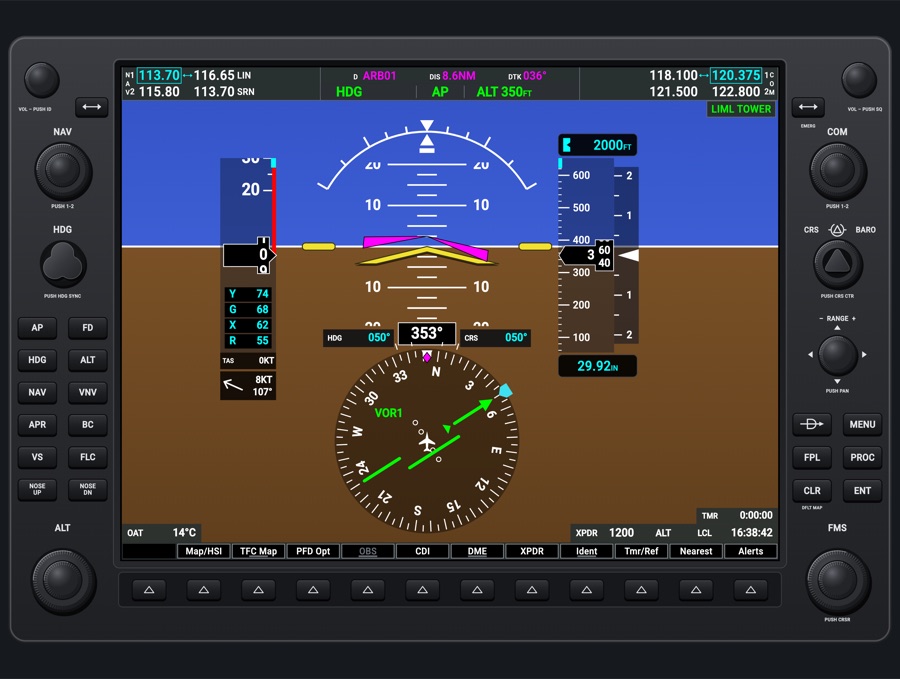
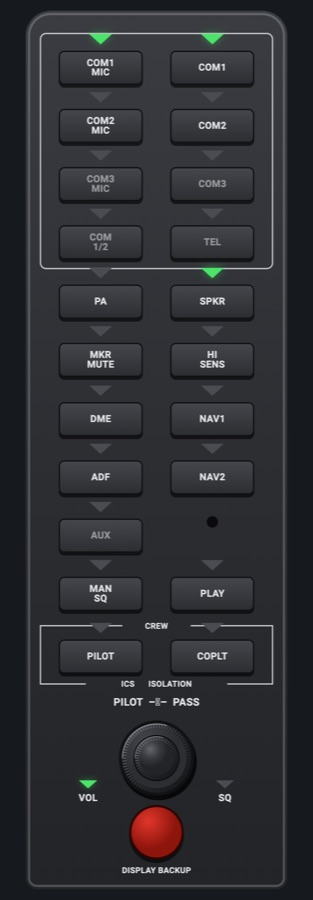
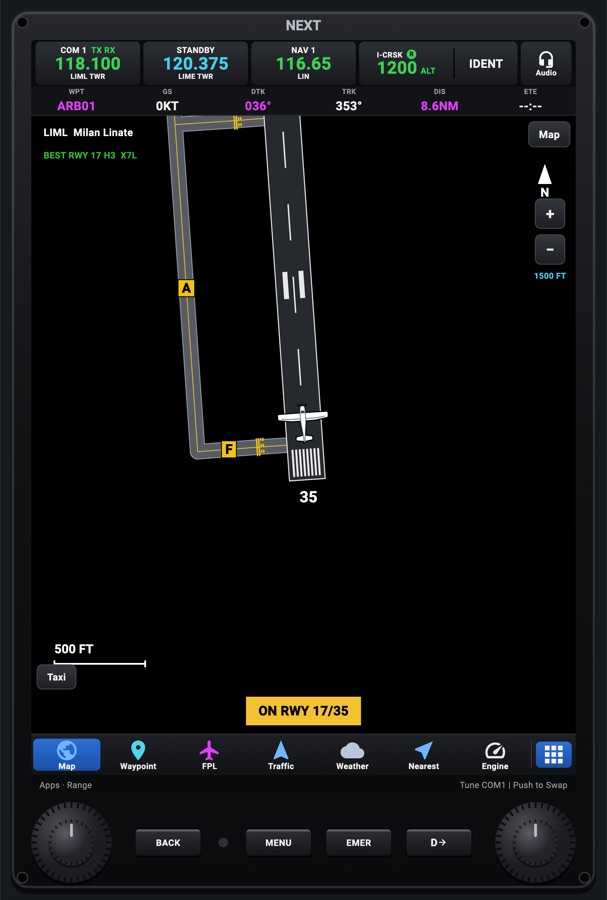
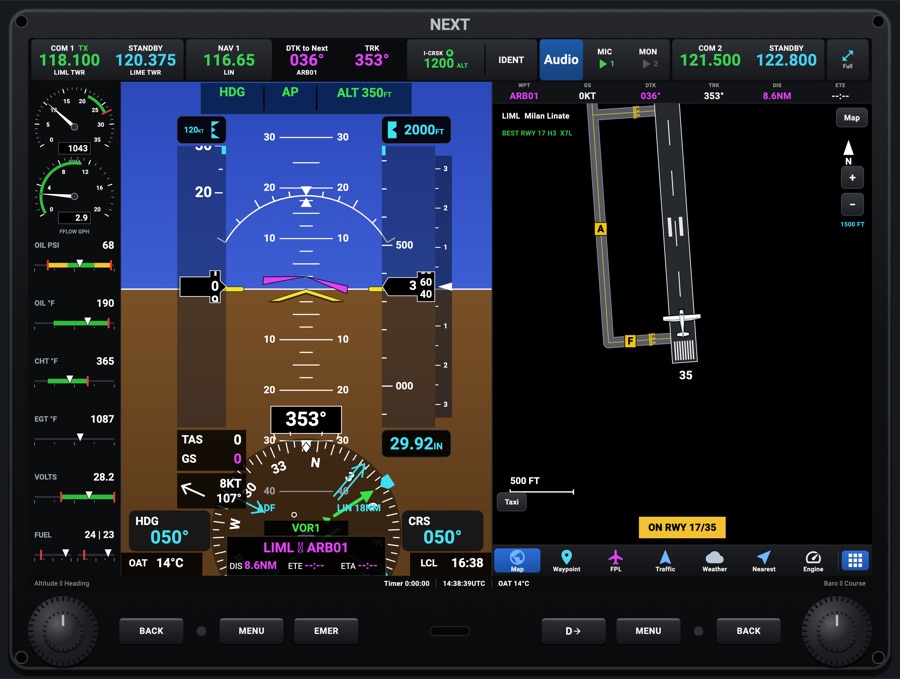
G1000-style MFD
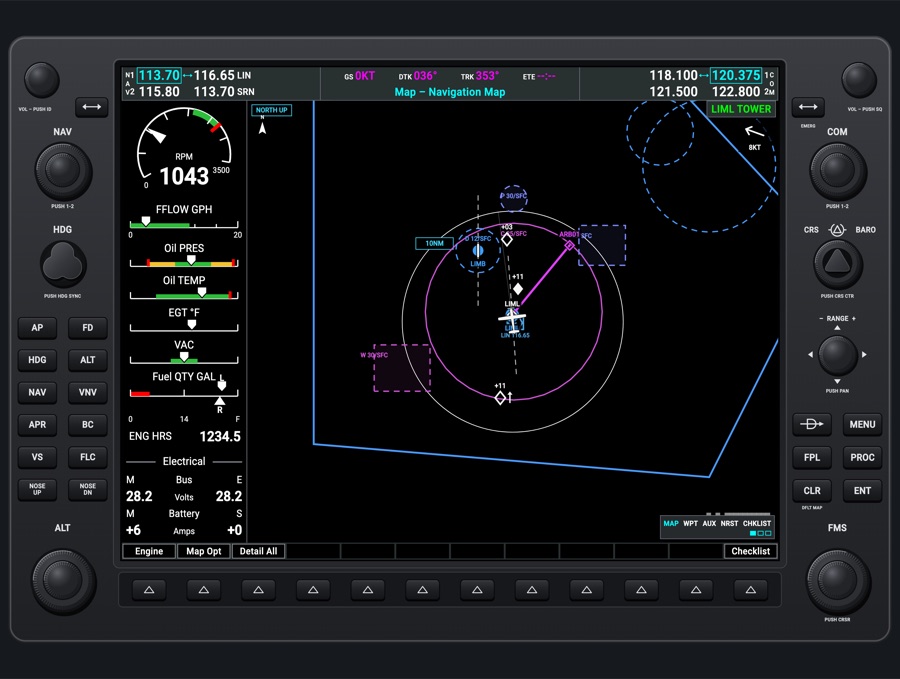
The G1000-style multi-function display, in the same bezel as the PFD. The engine strip (EIS) runs down the left, with the navigator's pages beside it: the moving map, traffic, datalink weather, flight plan, waypoint information, nearest, AUX and checklists. You move through it the real unit's way, with the FMS knob, the bezel keys and the softkeys.
- Modeled on
- Garmin G1000 NXi-style MFD (GDU 1040-style bezel)
- Category
- Displays
- Size
- 4 × 3 cells
- Version
- 1.0 · 2026-10-19
- Plan
- Pro
- Simulators
- MSFS 2020 · MSFS 2024 · X-Plane 11 · X-Plane 12
Variants
Navigation map (default)v1.0
MAP > NAVIGATION MAP, with the GS/DTK/TRK/ETE data bar and the page title tab
FMS outer knob to MAP group; CLR held (DFLT MAP)
Page groupsv1.0
MAP (Navigation, Traffic, Weather Data Link); WPT (Airport, Weather, Intersection, NDB, VOR, User Waypoint information); AUX (Trip Planning, Utility, System Setup, System Status); NRST (Airports, NDB, VOR, User Waypoints, Frequencies); CHKLIST
FMS outer knob picks the group, inner knob the page
Flight plan pagev1.0
The map with the ACTIVE FLIGHT PLAN, ACTIVE VNV PROFILE and SELECTED WAYPOINT WEATHER windows beside it. The FMS inner knob switches to the FLIGHT PLAN CATALOG
FPL key; View softkey: Wide / Narrow, Leg-Leg / CUM
EIS: Engine pagev1.0
RPM dial (with the MAN IN dial above it on a constant-speed engine), fuel flow, oil pressure and temperature, CHT (constant-speed engines), EGT, vacuum (if the aircraft has one), L/R fuel quantity, engine hours, M/E bus volts and battery amps
Engine > Engine softkey
EIS: Lean pagev1.0
EGT and CHT bar graphs per cylinder (4 or 6, by aircraft), with the selected cylinder in cyan. Also its EGT, ΔPeak (with Assist) and CHT, plus the fuel calculation
Engine > Lean; CYL SLCT, Assist
EIS: System pagev1.0
Oil PSI and °F as numbers, vacuum, fuel quantity, fuel calculation (GAL used / remaining) and the electrical readings
Engine > System; RST Fuel, GAL REM (-10/-1/+1/+10/full)
EIS with or without manifold pressurev1.0
Aircraft with a constant-speed engine get the MAN IN dial over the RPM dial and a CHT bar. Fixed-pitch ones don't
From the aircraft profile
Map optionsv1.0
Traffic, Inset (Off / VSD vertical profile), TER (Off / Topo / REL relative terrain), NEXRAD, METAR flags, Legend. Detail levels All, -3, -2, -1. Map Settings window: North Up / Track Up, Fuel Range ring, Traffic. After a MapLibre crash, Map Settings also shows Safe Map: Try MapLibre
Map Opt softkey; Detail softkey; MENU > Map Settings / Declutter / Show VSD
Reversionaryv1.0
The MFD becomes the flight display (the PFD's screen) with the engine strip beside it
Settings > Glass failures > Fail the G1000 PFD, or DISPLAY BACKUP
Failed displayv1.0
The screen goes dark
Settings > Glass failures > Fail the G1000 MFD
Power-up pagev1.0
After it boots, the MFD stays on the POWER-UP page (database info) until you press ENT
Avionics power on
Features
- Engine strip: dials and bars with the profile's color bands and red lines. Readings in caution or warning turn amber or red and flash for their first 10 s. Missing data gets a red X
- Fuel totalizer: GAL used is counted from fuel flow. RST Fuel sets full usable fuel, and GAL REM adjusts the remaining amount
- Lean assist: Assist finds each cylinder's peak and shows ΔPeak. CYL SLCT steps through cylinders, starting with the hottest. It's not available during Assist or a caution
- Map: drawn by MapLibre in a G1000 style (G1000 airspace colors: class B blue, C magenta, special-use dashed with a faint fill; flight plan waypoints as diamonds). G1000 ranges from 250 ft to 1000 nm on the RANGE knob. The joystick arrows pan the map a quarter of its range at a time, and pushing RANGE returns to the aircraft. With the map pointer on, ENT shows info for the waypoint under it
- Traffic map: heading up, rings at 2 and 6 nm, hollow/filled diamond and advisory symbols with relative altitude and climb/descent arrows (parked aircraft not shown). Operate/Standby and Above/Below/Normal/Unrestricted altitude bands
- Weather Data Link page: NEXRAD and METAR flags (VFR, MVFR, IFR, LIFR colors) with a legend. Weather Setup turns each one on or off
- Flight plan: an active-leg bracket and a cursor (push FMS) that moves over waypoints and altitudes. The inner knob inserts a waypoint, CLR asks REMOVE?, ENT activates the leg and Direct-To goes to the selected waypoint. Altitude constraints and VNV (VNV Prof, VNV D->, Cancel/Enable VNV)
- FPL MENU: Activate leg, VNV D->, Cancel VNV, Delete, Store and Invert the flight plan, Create a user waypoint, Remove departure/arrival/approach. The catalog can activate, invert, delete or store plans
- PROC: load an approach, arrival or departure, activate the approach or vectors to final. On WPT airport info, the DP, STAR and APR softkeys do the same
- WPT pages: airport (runways, frequencies, approaches), METAR weather, intersection, NDB and VOR info with the nearest airport/VOR, and user waypoints (New WPT here, Delete)
- NRST pages: airports (APT cursor, RNWY, FREQ puts the tower/CTAF frequency in COM1 standby, LD APR), VOR, NDB, user waypoints, and frequencies (ARTCC, FSS, weather)
- AUX: Trip Planning (trip, fuel and other stats), Utility (timers, trip statistics), System Setup 1/2 (date/time, display units, baro IN/HPA), and System Status (LRU list with green checks or red X from live data and failures, airframe, databases)
- Checklists for the aircraft profile, normal and EMERGCY, with CHECK/UNCHECK, RETURN and EXIT
- The softkey Alerts button and annunciations work as on the PFD. The same NAV/COM top bar and bezel as the PFD
Your aircraft: The engine strip follows the profile's EngineLimits: dial and bar ranges, color bands and red lines, whether there's a manifold-pressure dial and CHT bar (hasMan), whether a vacuum gauge shows, tank size and unusable fuel (for full fuel in the totalizer), and 4 cylinders (C172SP, C152, PA-28, DA40 NG, DA62) or 6. A generic (unknown) aircraft gets wide scales with no bands or red lines. Twins (BE58, PA34, DA62) show one engine's strip only. On the SF50 jet, N1 is drawn in the dial labeled RPM. Checklists come from the profile.
On the iPad
- The screen does not respond to touch. Everything is done with the bezel knobs, keys and softkeys
- FMS dual knob: the outer ring picks the page group, the inner knob the page. Push it for the cursor, which on the FPL page edits the plan
- RANGE knob: turn for the map range. Tap one of its four arrows to pan, and push it to return to the aircraft
- CLR closes a window or backs out. Hold CLR to go back to the default navigation map
- ENT confirms, and also dismisses the POWER-UP page
- MENU opens the page's options. FPL opens the flight plan page, PROC the procedures, and D-> the Direct-To window
- Tap a softkey button under its label
Settings
- Instrument picker 'G1000-style display' (Displays tab), DISPLAY: PFD, MFD or Audio panel
- Settings > Glass failures: Fail the G1000 PFD (the MFD goes reversionary) and Fail the G1000 MFD (dark)
- Settings > lighting dimmers: Red flood light, Glareshield, Displays, Labels and keys
- In-unit: map orientation, fuel range ring, traffic, terrain/topo, NEXRAD, METAR, declutter, VSD, and System Setup baro units (IN/HPA)
Keys and controllers
Map any of these to a key, a game controller's button or axis, or a MIDI knob (how):
- COM 1 MHz +
- COM 1 MHz -
- COM 1 channel +
- COM 1 channel -
- COM 1 swap
- COM 2 MHz +
- COM 2 MHz -
- COM 2 channel +
- COM 2 channel -
- COM 2 swap
- NAV 1 MHz +
- NAV 1 MHz -
- NAV 1 channel +
- NAV 1 channel -
- NAV 1 swap
- NAV 2 MHz +
- NAV 2 MHz -
- NAV 2 channel +
- NAV 2 channel -
- NAV 2 swap
- CDI: next source
- Course +
- Course -
- Course sync
- Heading bug +
- Heading bug -
- Heading bug sync
- Altitude +
- Altitude -
- Altitude sync
- Baro +
- Baro -
- Baro sync
- Autopilot AP
- Autopilot FD
- Autopilot YD
- Autopilot HDG
- Autopilot NAV
- Autopilot APR
- Autopilot BC
- Autopilot ALT
- Autopilot VS
- Autopilot FLC
- Autopilot LVL
- Autopilot UP / DN +
- Autopilot UP / DN -
- Transponder IDENT
- Transponder STBY
- Transponder ALT
- Direct-To
- MENU
- ENT
- CLR
- FPL
- PROC
- Large knob +
- Large knob -
- Small knob +
- Small knob -
- Knob push (cursor)
Simulator data
What the Hub reads from the simulator for this instrument, and what the instrument sends back. Names are the simulators' own: MSFS SimVars and events, X-Plane datarefs and commands.
Reads
| Value | MSFS | X-Plane |
|---|---|---|
| Engine RPM, engine 1 (rpm) | GENERAL ENG RPM:1 (rpm) | sim/cockpit2/engine/indicators/engine_speed_rpm[0] |
| Manifold pressure, engine 1 (inHg) | RECIP ENG MANIFOLD PRESSURE:1 (inHg) | sim/cockpit2/engine/indicators/MPR_in_hg[0] |
| Fuel flow, engine 1 (gal/h) | ENG FUEL FLOW GPH:1 (gallons per hour) | sim/cockpit2/engine/indicators/fuel_flow_kg_sec[0] |
| Left main tank quantity (gal) | FUEL TANK LEFT MAIN QUANTITY (gallons) | sim/cockpit2/fuel/fuel_quantity[0] |
| Right main tank quantity (gal) | FUEL TANK RIGHT MAIN QUANTITY (gallons) | sim/cockpit2/fuel/fuel_quantity[1] |
| Oil pressure, engine 1 (psi) | GENERAL ENG OIL PRESSURE:1 (psi) | sim/cockpit2/engine/indicators/oil_pressure_psi[0] |
| Oil temperature, engine 1 (degF) | GENERAL ENG OIL TEMPERATURE:1 (fahrenheit) | sim/cockpit2/engine/indicators/oil_temperature_deg_C[0]sim/aircraft/engine/acf_max_OILT |
| Exhaust gas temperature, engine 1 (degF) | GENERAL ENG EXHAUST GAS TEMPERATURE:1 (fahrenheit) | sim/cockpit2/engine/indicators/EGT_deg_C[0]sim/aircraft/engine/acf_max_EGT |
| Cylinder head temperature, engine 1 (degF) | RECIP ENG CYLINDER HEAD TEMPERATURE:1 (fahrenheit) | sim/cockpit2/engine/indicators/CHT_deg_C[0]sim/aircraft/engine/acf_max_CHT |
| Vacuum / suction (inHg) | SUCTION PRESSURE (inHg) | sim/cockpit/misc/vacuum |
| Main bus voltage (V) | ELECTRICAL MAIN BUS VOLTAGE (volts) | sim/cockpit2/electrical/bus_volts[0] |
| Ammeter, + charging (A) | ELECTRICAL BATTERY LOAD:1 (amperes) | sim/cockpit2/electrical/battery_amps[0] |
| Engine 1 running time (tach hour meter) (h) | GENERAL ENG ELAPSED TIME:1 (hours) | sim/time/hobbs_time |
| Ground speed (kt) | GPS GROUND SPEED (knots) | sim/flightmodel/position/groundspeed |
| Ground track (deg magnetic) | GPS GROUND MAGNETIC TRACK (degrees) | sim/cockpit2/gauges/indicators/ground_track_mag_pilot |
| Heading (glass AHRS heading, else magnetic heading) (deg magnetic) | HEADING INDICATOR (degrees) | sim/cockpit2/gauges/indicators/heading_AHARS_deg_mag_pilotsim/flightmodel/position/mag_psi |
| Aircraft latitude (deg) | PLANE LATITUDE (degrees) | sim/flightmodel/position/latitude |
| Aircraft longitude (deg) | PLANE LONGITUDE (degrees) | sim/flightmodel/position/longitude |
| Magnetic variation, + east (magnetic = true - variation) (deg) | MAGVAR (degrees) | sim/flightmodel/position/magnetic_variation |
| Indicated altitude (ft) | INDICATED ALTITUDE (feet) | sim/cockpit2/gauges/indicators/altitude_ft_pilot |
| Altimeter setting (inHg) | KOHLSMAN SETTING HG (inHg) | sim/cockpit2/gauges/actuators/barometer_setting_in_hg_pilot |
| Indicated airspeed (kt) | AIRSPEED INDICATED (knots) | sim/cockpit2/gauges/indicators/airspeed_kts_pilot |
| True airspeed (kt) | AIRSPEED TRUE (knots) | sim/flightmodel/position/true_airspeed |
| Outside air temperature (degC) | AMBIENT TEMPERATURE (celsius) | sim/cockpit2/temperature/outside_air_temp_degc |
| Pitch attitude, + nose up (deg) | ATTITUDE INDICATOR PITCH DEGREES (degrees) | sim/flightmodel/position/theta |
| On the ground (1/0) (bool) | SIM ON GROUND (bool) | sim/flightmodel/failures/onground_any |
| Sim local time, seconds since midnight (s) | LOCAL TIME (seconds) | sim/time/local_time_sec |
| Sim UTC time, seconds since midnight (s) | ZULU TIME (seconds) | sim/time/zulu_time_sec |
| Text: aircraft title / name (text) | TITLE (string256) | sim/aircraft/view/acf_ui_namesim/aircraft/view/acf_descrip |
| NAV1 active frequency (kHz) | NAV ACTIVE FREQUENCY:1 (MHz) | sim/cockpit2/radios/actuators/nav1_frequency_hz |
| NAV1 standby frequency (kHz) | NAV STANDBY FREQUENCY:1 (MHz) | sim/cockpit2/radios/actuators/nav1_standby_frequency_hz |
| NAV2 active frequency (kHz) | NAV ACTIVE FREQUENCY:2 (MHz) | sim/cockpit2/radios/actuators/nav2_frequency_hz |
| NAV2 standby frequency (kHz) | NAV STANDBY FREQUENCY:2 (MHz) | sim/cockpit2/radios/actuators/nav2_standby_frequency_hz |
| Text: NAV1 station ident (e.g. SEA) (text) | NAV IDENT:1 | Not available |
| Text: NAV2 station ident (text) | NAV IDENT:2 | Not available |
| NAV1 DME distance (nm) | NAV DME:1 (nautical miles)NAV HAS DME:1 (bool) | sim/cockpit2/radios/indicators/nav1_dme_distance_nmsim/cockpit2/radios/indicators/nav1_has_dme |
| NAV1 station has DME (1/0) (bool) | NAV HAS DME:1 (bool) | sim/cockpit2/radios/indicators/nav1_has_dme |
| NAV2 DME distance (nm) | NAV DME:2 (nautical miles)NAV HAS DME:2 (bool) | sim/cockpit2/radios/indicators/nav2_dme_distance_nmsim/cockpit2/radios/indicators/nav2_has_dme |
| NAV2 station has DME (1/0) (bool) | NAV HAS DME:2 (bool) | sim/cockpit2/radios/indicators/nav2_has_dme |
| CDI/HSI navigation source: 0 GPS, 1 NAV (enum) | GPS DRIVES NAV1 (bool) | sim/cockpit2/radios/actuators/HSI_source_select_pilot |
| COM1 active frequency (kHz) | COM ACTIVE FREQUENCY:1 (MHz) | sim/cockpit2/radios/actuators/com1_frequency_hz_833 |
| COM1 standby frequency (kHz) | COM STANDBY FREQUENCY:1 (MHz) | sim/cockpit2/radios/actuators/com1_standby_frequency_hz_833 |
| COM2 active frequency (kHz) | COM ACTIVE FREQUENCY:2 (MHz) | sim/cockpit2/radios/actuators/com2_frequency_hz_833 |
| COM2 standby frequency (kHz) | COM STANDBY FREQUENCY:2 (MHz) | sim/cockpit2/radios/actuators/com2_standby_frequency_hz_833 |
| COM transmitting: 1, 2, 0 none (enum) | COM TRANSMIT:1 (bool)COM TRANSMIT:2 (bool) | sim/cockpit2/radios/actuators/audio_com_selection |
| Audio panel keys lit, one bit each (AudioBit: nav1, nav2, dme, adf, mkr, spkr) (bitfield) | NAV SOUND:1 (bool)NAV SOUND:2 (bool)DME SOUND (bool)ADF SOUND:1 (bool)MARKER SOUND (bool)SPEAKER ACTIVE (bool) | sim/cockpit2/radios/actuators/audio_selection_nav1sim/cockpit2/radios/actuators/audio_selection_nav2sim/cockpit2/radios/actuators/audio_dme_enabledsim/cockpit2/radios/actuators/audio_selection_adf1sim/cockpit2/radios/actuators/audio_marker_enabled |
| Transponder mode: 0 off, 1 standby, 2 test, 3 on, 4 altitude (enum) | TRANSPONDER STATE:1 (number) | sim/cockpit2/radios/actuators/transponder_mode |
| Selected altitude (ft) | AUTOPILOT ALTITUDE LOCK VAR (feet) | sim/cockpit2/autopilot/altitude_dial_ft |
Sends
| When you… | MSFS | X-Plane |
|---|---|---|
| NAV knob or transfer key on NAV 1 (nav2 on NAV 2) | NAV1_STBY_SET_HZNAV1_RADIO_SWAP | sim/cockpit2/radios/actuators/nav1_standby_frequency_hzsim/radios/nav1_standy_flip |
| NAV knob or transfer key on NAV 2 | NAV2_STBY_SET_HZNAV2_RADIO_SWAP | sim/cockpit2/radios/actuators/nav2_standby_frequency_hzsim/radios/nav2_standy_flip |
| COM knob or transfer key on COM 1; EMERG; NRST FREQ softkey or a selected frequency tunes COM standby | COM_STBY_RADIO_SET_HZCOM_STBY_RADIO_SWAP | sim/cockpit2/radios/actuators/com1_standby_frequency_hz_833sim/radios/com1_standy_flip |
| COM knob or transfer key on COM 2 | COM2_STBY_RADIO_SET_HZCOM2_RADIO_SWAP | sim/cockpit2/radios/actuators/com2_standby_frequency_hz_833sim/radios/com2_standy_flip |
| HDG knob turned | HEADING_BUG_SET | sim/cockpit2/autopilot/heading_dial_deg_mag_pilot |
| HDG knob pushed | HEADING_GYRO_SETHEADING_BUG_SET | sim/instruments/DG_sync_magsim/cockpit2/autopilot/heading_dial_deg_mag_pilot |
| ALT knob turned | AP_ALT_VAR_SET_ENGLISH | sim/cockpit2/autopilot/altitude_dial_ft |
| ALT knob pushed | AP_ALT_VAR_SET_ENGLISH | sim/cockpit2/autopilot/altitude_dial_ft |
| CRS/BARO outer ring | KOHLSMAN_SET | sim/cockpit2/gauges/actuators/barometer_setting_in_hg_pilot |
| CRS/BARO inner knob (crs2 with the CDI on VOR2) | VOR1_SET | sim/cockpit2/radios/actuators/nav1_obs_deg_mag_pilotsim/cockpit2/radios/actuators/hsi_obs_deg_mag_pilot (also, when HSI_source_select_pilot == 0) |
| CRS/BARO knob pushed | VOR1_SET | sim/cockpit2/radios/actuators/nav1_obs_deg_mag_pilotsim/cockpit2/radios/actuators/hsi_obs_deg_mag_pilot (when HSI shows NAV1) |
| Autopilot bezel keys | AP_MASTERTOGGLE_FLIGHT_DIRECTORYAW_DAMPER_TOGGLEAP_PANEL_HEADING_HOLDAP_NAV1_HOLDAP_APR_HOLDAP_BC_HOLDAP_ALT_HOLDAP_PANEL_VS_HOLDFLIGHT_LEVEL_CHANGEAP_WING_LEVELER | sim/autopilot/servos_togglesim/autopilot/fdir_togglesim/systems/yaw_damper_togglesim/autopilot/headingsim/autopilot/NAVsim/autopilot/approachsim/autopilot/back_coursesim/autopilot/altitude_holdsim/autopilot/vertical_speedsim/autopilot/level_changesim/autopilot/wing_leveler |
| NOSE UP / NOSE DN | AP_VS_VAR_SET_ENGLISHAP_SPD_VAR_SETAP_PITCH_REF_INC_UPAP_PITCH_REF_INC_DN | sim/cockpit2/autopilot/vvi_dial_fpmsim/cockpit2/autopilot/airspeed_dial_kts_machsim/autopilot/nose_upsim/autopilot/nose_down |
| NAV VOL knob pushed (ID) | RADIO_VOR1_IDENT_TOGGLERADIO_VOR2_IDENT_TOGGLERADIO_DME1_IDENT_TOGGLERADIO_ADF_IDENT_TOGGLEMARKER_SOUND_TOGGLETOGGLE_SPEAKER | sim/cockpit2/radios/actuators/audio_selection_nav1sim/cockpit2/radios/actuators/audio_selection_nav2sim/cockpit2/radios/actuators/audio_dme_enabledsim/cockpit2/radios/actuators/audio_selection_adf1sim/cockpit2/radios/actuators/audio_marker_enabled |
Add-on aircraft with their own systems may use other variables; the Hub reads the standard ones.
Changes
The instrument's version counts what its faces share (the case, the mechanism, the data, the sounds); a face's own version counts that face alone.
- 1.0 2026-10-19
- First numbered version.