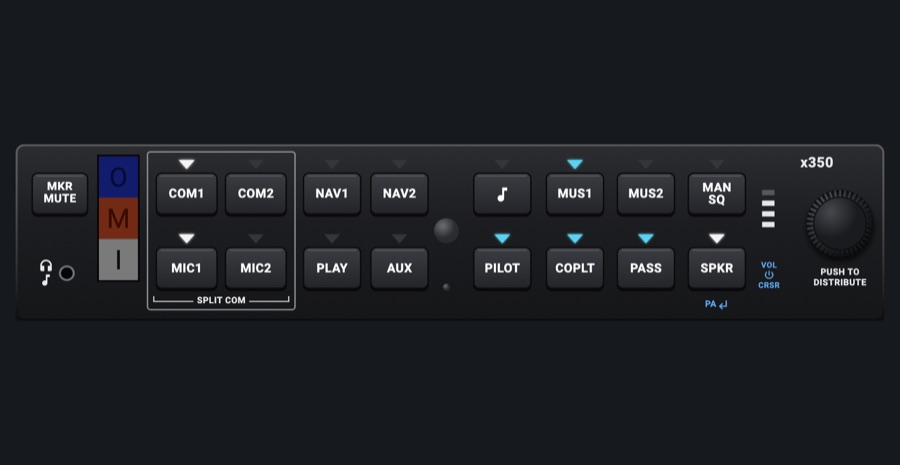
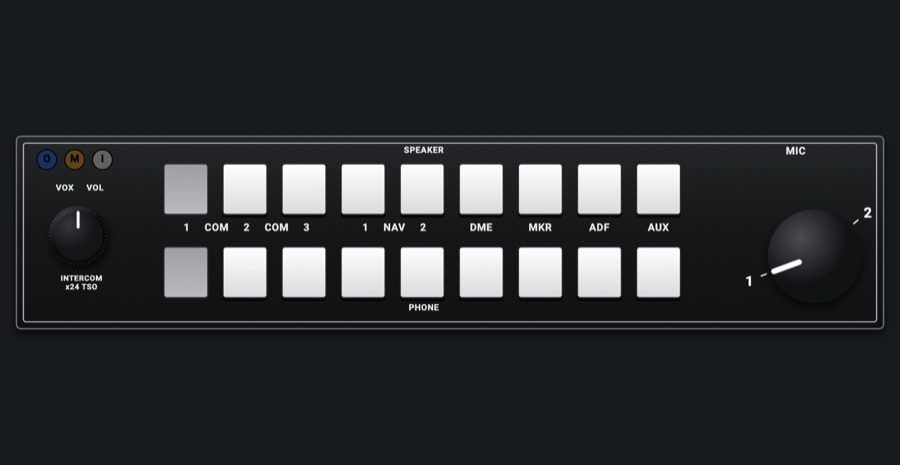
G1000-style audio panel
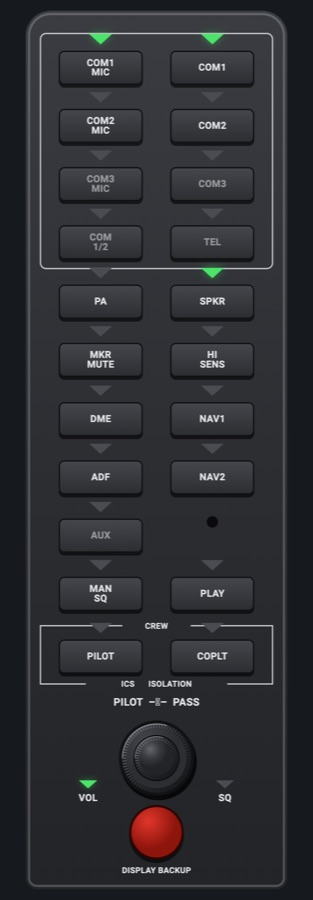
The G1000's audio panel, its later version: a tall strip that sits between the PFD and the MFD. Its keys pick the COM you transmit on, which COMs and NAV aids you hear, the marker and the speaker, each with a triangular annunciator above it that lights green. The red DISPLAY BACKUP button puts both G1000 displays into reversionary mode.
- Modeled on
- Garmin GMA 1347-style audio panel
- Category
- Displays
- Size
- 1 × 3 cells
- Version
- 1.0 · 2026-10-19
- Plan
- Pro
- Simulators
- MSFS 2020 · MSFS 2024 · X-Plane 11 · X-Plane 12
Variants
Dayv1.0
Light gray key legends and printing on dark keys
Panel lighting: day
Nightv1.0
Warm backlit key legends and printing that follow the Labels and keys dimmer
Panel lighting: night / auto; Labels and keys dimmer
DISPLAY BACKUP onv1.0
The button lights bright red with a glow, and both G1000 displays go reversionary
Tap DISPLAY BACKUP
Features
- Two columns of keys laid out as on the real unit: COM1 MIC / COM1, COM2 MIC / COM2, COM3 MIC / COM3, COM 1/2 / TEL (the COM keys boxed together), PA / SPKR, MKR MUTE / HI SENS, DME / NAV1, ADF / NAV2, AUX (with the photocell beside it), MAN SQ / PLAY, PILOT / COPLT (in the CREW / ICS ISOLATION box)
- Each key has a triangular annunciator above it that lights green, following the sim: the MIC you transmit on, the COMs you hear, and the NAV1, NAV2, DME, ADF, MKR and SPKR audio
- COM3, COM 1/2, TEL and AUX are dark, as in the Nav III installation
- PA, HI SENS, MAN SQ, PLAY, PILOT and COPLT toggle their own lights. They have no sim counterpart
- PILOT – PASS intercom dual knob with VOL and SQ lights. Pushing it switches between volume and squelch
- DISPLAY BACKUP: the round red button turns reversionary mode on by hand and glows while on. The PFD and MFD each show the flight display with the engine strip. Press it again to go back
- Key legends and printing backlit at night
On the iPad
- Tap a key to toggle it. COM1 MIC / COM2 MIC selects the transmitting COM. COM1 / COM2 turns listening to that COM on or off
- Tap NAV1, NAV2, DME, ADF, MKR MUTE or SPKR to toggle that audio in the sim
- Push the PILOT knob to switch between VOL and SQ. Turning it has no effect
- Tap DISPLAY BACKUP to turn reversionary mode on or off
Settings
- Instrument picker 'G1000-style display' (Displays tab), DISPLAY: Audio panel (the same picker entry as the PFD and MFD)
Keys and controllers
Map any of these to a key, a game controller's button or axis, or a MIDI knob (how):
- Transmit on COM 1
- Transmit on COM 2
- Audio NAV 1
- Audio NAV 2
- Audio DME
- Audio ADF
- Audio MKR
Simulator data
What the Hub reads from the simulator for this instrument, and what the instrument sends back. Names are the simulators' own: MSFS SimVars and events, X-Plane datarefs and commands.
Reads
| Value | MSFS | X-Plane |
|---|---|---|
| Audio panel keys lit, one bit each (AudioBit: nav1, nav2, dme, adf, mkr, spkr) (bitfield) | NAV SOUND:1 (bool)NAV SOUND:2 (bool)DME SOUND (bool)ADF SOUND:1 (bool)MARKER SOUND (bool)SPEAKER ACTIVE (bool) | sim/cockpit2/radios/actuators/audio_selection_nav1sim/cockpit2/radios/actuators/audio_selection_nav2sim/cockpit2/radios/actuators/audio_dme_enabledsim/cockpit2/radios/actuators/audio_selection_adf1sim/cockpit2/radios/actuators/audio_marker_enabled |
| COM transmitting: 1, 2, 0 none (enum) | COM TRANSMIT:1 (bool)COM TRANSMIT:2 (bool) | sim/cockpit2/radios/actuators/audio_com_selection |
| COM1 heard (1/0) (bool) | COM RECEIVE:1 (bool) | sim/cockpit2/radios/actuators/audio_selection_com1 |
| COM2 heard (1/0) (bool) | COM RECEIVE:2 (bool) | sim/cockpit2/radios/actuators/audio_selection_com2 |
Sends
| When you… | MSFS | X-Plane |
|---|---|---|
| COM1 MIC (1) or COM2 MIC (2) tapped | COM1_TRANSMIT_SELECTCOM2_TRANSMIT_SELECT | sim/cockpit2/radios/actuators/audio_com_selection (6 = COM1, 7 = COM2) |
| COM1 or COM2 tapped: listening on (+n) or off (-n) | COM1_RECEIVE_SELECTCOM2_RECEIVE_SELECT | sim/cockpit2/radios/actuators/audio_selection_com1sim/cockpit2/radios/actuators/audio_selection_com2 |
| SPKR, MKR MUTE, DME, NAV1, ADF, NAV2 tapped (AudioBit index) | RADIO_VOR1_IDENT_TOGGLERADIO_VOR2_IDENT_TOGGLERADIO_DME1_IDENT_TOGGLERADIO_ADF_IDENT_TOGGLEMARKER_SOUND_TOGGLETOGGLE_SPEAKER | sim/cockpit2/radios/actuators/audio_selection_nav1sim/cockpit2/radios/actuators/audio_selection_nav2sim/cockpit2/radios/actuators/audio_dme_enabledsim/cockpit2/radios/actuators/audio_selection_adf1sim/cockpit2/radios/actuators/audio_marker_enabled |
Add-on aircraft with their own systems may use other variables; the Hub reads the standard ones.
Changes
The instrument's version counts what its faces share (the case, the mechanism, the data, the sounds); a face's own version counts that face alone.
- 1.0 2026-10-19
- First numbered version.