SL30-style NAV/COM
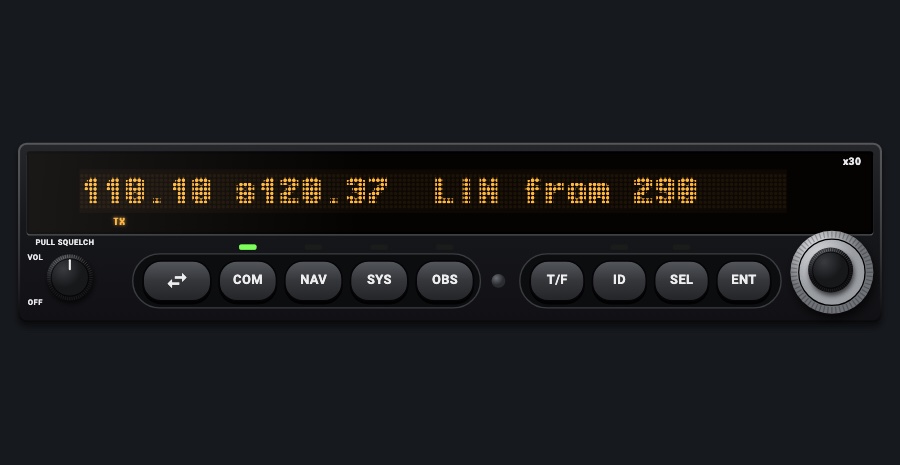
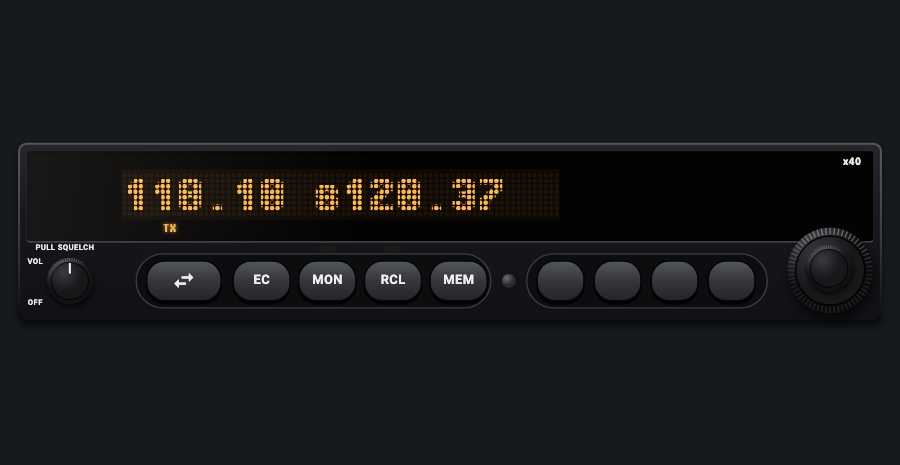
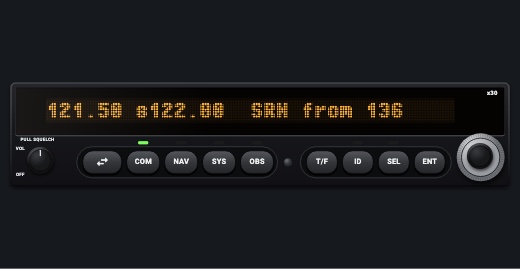
A NAV/COM in the style of the SL30, its single line of amber LED dot-matrix characters showing the active and standby frequencies plus the VOR radial, or an OBS page with a bar-graph CDI. SEL opens recall lists (nearby stations, recent, user, weather, emergency). Comes as NAV/COM 1 or NAV/COM 2.
- Modeled on
- Garmin (Apollo) SL30-style NAV/COM
- Category
- Radios and panels
- Size
- 2 × 1 cells
- Version
- 1.0 · 2026-10-19
- Plan
- Pro
- Simulators
- MSFS 2020 · MSFS 2024 · X-Plane 11 · X-Plane 12
Variants
NAV/COM 1v1.0
Tunes COM 1 / NAV 1, OBS turns the NAV 1 course
Picker: RADIO > NAV/COM 1
NAV/COM 2v1.0
Tunes COM 2 / NAV 2, OBS turns the NAV 2 course
Picker: RADIO > NAV/COM 2
Features
- 32-character amber LED line: the active, then s (or m while monitoring) and the standby
- Right side: the VOR ident and the radial from it, or the bearing to it with T/F; 'vor ---' without a valid signal
- OBS page: the course, to / fr, and a bar-graph CDI; '---flagged---' without a valid signal
- TX under the active while transmitting on that COM
- SEL recall lists: COM remote (airports around), autolist (recent), user, weather (162.400-162.550), emergency (121.50); NAV remote VORs, autolist, user
- ENT stores the standby as a user frequency ('store as <ident>', 'Database Full' at 15)
- Green LEDs over COM, NAV, SYS, OBS, ID and SEL when active
- SYS pages listed as on the real unit (display only)
- Display dark without avionics power; dimmed at night, faceplate under the red flood light
On the iPad
- Drag the dual knob: outer MHz, inner channel of COM or NAV; on the OBS page it turns the course (outer 10 degrees, inner 1 degree); in recall lists outer picks the list, inner the entry
- Tap the swap key to swap active and standby (in a list, loads the entry first)
- Tap COM or NAV to select that radio; tap it again to toggle monitoring its standby
- Tap OBS for the OBS page; tap OBS again to center the needle on the current radial
- Tap T/F to switch between the radial FROM and the bearing TO the station
- Tap ID to cycle ident off / IDENT / VOICE (toggles the NAV ident audio)
- Tap SEL for the recall lists, ENT to load the entry into the standby (or to store the standby)
- Tap SYS for the system pages
Settings
- Which radio: NAV/COM 1 or NAV/COM 2 (picker variant)
Keys and controllers
Map any of these to a key, a game controller's button or axis, or a MIDI knob (how):
- COM 1 MHz +
- COM 1 MHz -
- COM 1 channel +
- COM 1 channel -
- COM 1 swap
- NAV 1 MHz +
- NAV 1 MHz -
- NAV 1 channel +
- NAV 1 channel -
- NAV 1 swap
Simulator data
What the Hub reads from the simulator for this instrument, and what the instrument sends back. Names are the simulators' own: MSFS SimVars and events, X-Plane datarefs and commands.
Reads
| Value | MSFS | X-Plane |
|---|---|---|
| COM1 active frequency (kHz) | COM ACTIVE FREQUENCY:1 (MHz) | sim/cockpit2/radios/actuators/com1_frequency_hz_833 |
| COM1 standby frequency (kHz) | COM STANDBY FREQUENCY:1 (MHz) | sim/cockpit2/radios/actuators/com1_standby_frequency_hz_833 |
| COM2 active frequency (kHz) | COM ACTIVE FREQUENCY:2 (MHz) | sim/cockpit2/radios/actuators/com2_frequency_hz_833 |
| COM2 standby frequency (kHz) | COM STANDBY FREQUENCY:2 (MHz) | sim/cockpit2/radios/actuators/com2_standby_frequency_hz_833 |
| NAV1 active frequency (kHz) | NAV ACTIVE FREQUENCY:1 (MHz) | sim/cockpit2/radios/actuators/nav1_frequency_hz |
| NAV1 standby frequency (kHz) | NAV STANDBY FREQUENCY:1 (MHz) | sim/cockpit2/radios/actuators/nav1_standby_frequency_hz |
| NAV2 active frequency (kHz) | NAV ACTIVE FREQUENCY:2 (MHz) | sim/cockpit2/radios/actuators/nav2_frequency_hz |
| NAV2 standby frequency (kHz) | NAV STANDBY FREQUENCY:2 (MHz) | sim/cockpit2/radios/actuators/nav2_standby_frequency_hz |
| COM transmitting: 1, 2, 0 none (enum) | COM TRANSMIT:1 (bool)COM TRANSMIT:2 (bool) | sim/cockpit2/radios/actuators/audio_com_selection |
| NAV1 receiving a station (1/0) (bool) | NAV HAS NAV:1 (bool) | sim/cockpit2/radios/indicators/nav1_flag_from_to_pilot |
| NAV1 receiver course deviation, + = course right (dots (-2.5..2.5)) | NAV CDI:1 (number) | sim/cockpit2/radios/indicators/nav1_hdef_dots_pilot |
| NAV1 TO/FROM: 0 off, 1 TO, 2 FROM (enum) | NAV TOFROM:1 (enum) | sim/cockpit2/radios/indicators/nav1_flag_from_to_pilot |
| NAV1 OBS course (deg) | NAV OBS:1 (degrees) | sim/cockpit2/radios/actuators/nav1_obs_deg_mag_pilot |
| NAV2 receiving a station (1/0) (bool) | NAV HAS NAV:2 (bool) | sim/cockpit2/radios/indicators/nav2_flag_from_to_pilot |
| NAV2 receiver course deviation, + = course right (dots (-2.5..2.5)) | NAV CDI:2 (number) | sim/cockpit2/radios/indicators/nav2_hdef_dots_pilot |
| NAV2 TO/FROM: 0 off, 1 TO, 2 FROM (enum) | NAV TOFROM:2 (enum) | sim/cockpit2/radios/indicators/nav2_flag_from_to_pilot |
| NAV2 OBS course (deg) | NAV OBS:2 (degrees) | sim/cockpit2/radios/actuators/nav2_obs_deg_mag_pilot |
| Aircraft latitude (deg) | PLANE LATITUDE (degrees) | sim/flightmodel/position/latitude |
| Aircraft longitude (deg) | PLANE LONGITUDE (degrees) | sim/flightmodel/position/longitude |
| Magnetic variation, + east (magnetic = true - variation) (deg) | MAGVAR (degrees) | sim/flightmodel/position/magnetic_variation |
Sends
| When you… | MSFS | X-Plane |
|---|---|---|
| Knob on COM, swap, recall entries into the standby; com2 on NAV/COM 2 | COM_STBY_RADIO_SET_HZCOM_STBY_RADIO_SWAP | sim/cockpit2/radios/actuators/com1_standby_frequency_hz_833sim/radios/com1_standy_flip |
| Knob on NAV, swap, NAV recall entries; nav2 on NAV/COM 2 | NAV1_STBY_SET_HZNAV1_RADIO_SWAP | sim/cockpit2/radios/actuators/nav1_standby_frequency_hzsim/radios/nav1_standy_flip |
| Knob on the OBS page (NAV/COM 1); crs2 on NAV/COM 2 | VOR1_SET | sim/cockpit2/radios/actuators/nav1_obs_deg_mag_pilotsim/cockpit2/radios/actuators/hsi_obs_deg_mag_pilot (also, when HSI_source_select_pilot == 0) |
| OBS pressed again on the OBS page (NAV/COM 1); crs2Sync on NAV/COM 2 | VOR1_SET | sim/cockpit2/radios/actuators/nav1_obs_deg_mag_pilotsim/cockpit2/radios/actuators/hsi_obs_deg_mag_pilot (when HSI shows NAV1) |
| ID to IDENT or back to off (the NAV 1 / NAV 2 audio bit) | RADIO_VOR1_IDENT_TOGGLERADIO_VOR2_IDENT_TOGGLERADIO_DME1_IDENT_TOGGLERADIO_ADF_IDENT_TOGGLEMARKER_SOUND_TOGGLETOGGLE_SPEAKER | sim/cockpit2/radios/actuators/audio_selection_nav1sim/cockpit2/radios/actuators/audio_selection_nav2sim/cockpit2/radios/actuators/audio_dme_enabledsim/cockpit2/radios/actuators/audio_selection_adf1sim/cockpit2/radios/actuators/audio_marker_enabled |
Add-on aircraft with their own systems may use other variables; the Hub reads the standard ones.
Changes
The instrument's version counts what its faces share (the case, the mechanism, the data, the sounds); a face's own version counts that face alone.
- 1.0 2026-10-19
- First numbered version.